
Lab 08 assignment (20 pts)#
UW Geospatial Data Analysis
CEE467/CEWA567
David Shean, Eric Gagliano, Quinn Brencher
Introduction#
Objectives#
Explore spatial and temporal relationships of time series data
Work with Pandas Timestamp and Python DateTime objects
Handle data gaps effectively
Determine correlation of time-series records
Investigate and interpret spatial and temporal autocorrelation
Try out some interpolation routines to create continuous gridded values from sparse points
Visualize recent snow accumulation in your region
Learn about the SNOTEL network and explore some fundamental concepts and metrics for snow science
Instructions#
For each question or task below, write some code in the empty cell and execute to preserve your output
If you are in the graduate section of the class, please complete the challenge questions
Work together, consult resources we’ve discussed, post on slack!
Part 0: Imports and filenames#
First, let’s import the libraries we’ll need. Make sure to shut down any other kernels you have running!#
import os
from datetime import datetime
import numpy as np
import matplotlib.pyplot as plt
import pandas as pd
import geopandas as gpd
from shapely.geometry import Point
import folium
import contextily as ctx
import scipy.stats
import scipy.interpolate
import tqdm
from pathlib import Path
import xarray as xr
import skgstat as skg
import seaborn as sns
import pysal
from pysal.explore import esda
from pysal.lib import weights
from splot.esda import moran_scatterplot
from sklearn.preprocessing import StandardScaler
from sklearn.decomposition import PCA
from matplotlib_scalebar.scalebar import ScaleBar
/home/eric/miniconda3/envs/uwgda2025/lib/python3.12/site-packages/spaghetti/network.py:41: FutureWarning: The next major release of pysal/spaghetti (2.0.0) will drop support for all ``libpysal.cg`` geometries. This change is a first step in refactoring ``spaghetti`` that is expected to result in dramatically reduced runtimes for network instantiation and operations. Users currently requiring network and point pattern input as ``libpysal.cg`` geometries should prepare for this simply by converting to ``shapely`` geometries.
  warnings.warn(dep_msg, FutureWarning, stacklevel=1)
snotel_data_dir = f'{Path.home()}/gda_demo_data/snotel_data'
!ls -lh {snotel_data_dir}
total 1.1G
-rw-r--r-- 1 eric eric 1.1G Feb 27 19:10 snotel_data.nc
-rw-r--r-- 1 eric eric 456K Feb 27 19:09 snotel_stations.geojson
Part 1: Explore the SNOTEL sites (4 pts)#
Load SNOTEL sites geojson#
all_stations_gdf = gpd.read_file(f'{snotel_data_dir}/snotel_stations.geojson').set_index('code')
all_stations_gdf
| name | network | elevation_m | latitude | longitude | state | HUC | mgrs | mountainRange | beginDate | endDate | csvData | geometry | |
|---|---|---|---|---|---|---|---|---|---|---|---|---|---|
| code | |||||||||||||
| 301_CA_SNTL | Adin Mtn | SNOTEL | 1886.712036 | 41.235828 | -120.791924 | California | 180200021403 | 10TFL | Great Basin Ranges | 1983-10-01 | 2025-02-27 | True | POINT (-120.79192 41.23583) |
| 907_UT_SNTL | Agua Canyon | SNOTEL | 2712.719971 | 37.522171 | -112.271179 | Utah | 160300020301 | 12SUG | Colorado Plateau | 1994-10-01 | 2025-02-27 | True | POINT (-112.27118 37.52217) |
| 916_MT_SNTL | Albro Lake | SNOTEL | 2529.840088 | 45.597229 | -111.959023 | Montana | 100200050701 | 12TVR | Central Montana Rocky Mountains | 1996-09-01 | 2025-02-27 | True | POINT (-111.95902 45.59723) |
| 1267_AK_SNTL | Alexander Lake | SNOTEL | 48.768002 | 61.749668 | -150.889664 | Alaska | 190205051106 | 05VPJ | None | 2014-08-28 | 2025-02-27 | True | POINT (-150.88966 61.74967) |
| 908_WA_SNTL | Alpine Meadows | SNOTEL | 1066.800049 | 47.779572 | -121.698471 | Washington | 171100100501 | 10TET | Cascade Range | 1994-09-01 | 2025-02-27 | True | POINT (-121.69847 47.77957) |
| ... | ... | ... | ... | ... | ... | ... | ... | ... | ... | ... | ... | ... | ... |
| SLT | Slate Creek | CCSS | 1737.360000 | 41.043980 | -122.480103 | California | 180200050304 | 10TEL | Klamath Mountains | 2004-10-01 | 2025-02-27 | True | POINT (-122.4801 41.04398) |
| SLI | Slide Canyon | CCSS | 2804.160000 | 38.091234 | -119.431881 | California | 180400090501 | 11SKC | Sierra Nevada | 2005-10-01 | 2025-02-27 | True | POINT (-119.43188 38.09123) |
| SLK | South Lake | CCSS | 2926.080000 | 37.175903 | -118.562660 | California | 180901020601 | 11SLB | Sierra Nevada | 2004-10-01 | 2025-02-27 | True | POINT (-118.56266 37.1759) |
| STL | State Lakes | CCSS | 3169.920000 | 36.926483 | -118.573250 | California | 180300100305 | 11SLA | Sierra Nevada | 2018-11-01 | 2025-02-27 | True | POINT (-118.57325 36.92648) |
| TMR | Tamarack Summit | CCSS | 2301.240000 | 37.163750 | -119.200531 | California | 180400060903 | 11SLB | Sierra Nevada | 2011-01-01 | 2025-02-27 | True | POINT (-119.20053 37.16375) |
969 rows × 13 columns
Let’s quickly visualize with .explore()#
When you’re done, comment the following cell out, and rerun the cell to clear the plot, then save the notebook
#all_stations_gdf.drop(columns=['beginDate','endDate']).explore(column='elevation_m', cmap='inferno')
Written response: Where are station locations the most dense? Are there any areas you think are undersampled?#
STUDENT WRITTEN RESPONSE HERE
Load in state data, filter out Alaska stations, and reproject#
Can use the same Albers Equal Area projection from previous labs, or recompute based on bounds and center of SNOTEL sites
states_url = 'http://eric.clst.org/assets/wiki/uploads/Stuff/gz_2010_us_040_00_5m.json'
states_gdf = gpd.read_file(states_url)
Remove stations in Alaska from the all_stations_gdf#
You could use the
.clip()function, or maybe even easier you can use theall_stations_gdfnamecolumn
# STUDENT CODE HERE
| name | network | elevation_m | latitude | longitude | state | HUC | mgrs | mountainRange | beginDate | endDate | csvData | geometry | |
|---|---|---|---|---|---|---|---|---|---|---|---|---|---|
| code | |||||||||||||
| 755_NM_SNTL | Signal Peak | SNOTEL | 2548.127930 | 32.924011 | -108.145378 | New Mexico | 150400010803 | 12SYB | Southwest Basins and Ranges | 1978-10-01 | 2025-02-27 | True | POINT (-108.14538 32.92401) |
| 1048_NM_SNTL | Mcknight Cabin | SNOTEL | 2816.352051 | 33.008121 | -107.869751 | New Mexico | 130302020103 | 13SBS | Southwest Basins and Ranges | 2003-09-25 | 2025-02-27 | True | POINT (-107.86975 33.00812) |
| 595_NM_SNTL | Lookout Mountain | SNOTEL | 2590.800049 | 33.360271 | -107.831223 | New Mexico | 150400010402 | 13SBS | Southwest Basins and Ranges | 1978-10-01 | 2025-02-27 | True | POINT (-107.83122 33.36027) |
| 757_NM_SNTL | Silver Creek Divide | SNOTEL | 2743.199951 | 33.371059 | -108.706177 | New Mexico | 150400040605 | 12SYB | Southwest Basins and Ranges | 1978-10-01 | 2025-02-27 | True | POINT (-108.70618 33.37106) |
| 486_NM_SNTL | Frisco Divide | SNOTEL | 2438.399902 | 33.736462 | -108.945023 | New Mexico | 150400040303 | 12SXC | Colorado Plateau | 1971-10-01 | 2025-02-27 | True | POINT (-108.94502 33.73646) |
| ... | ... | ... | ... | ... | ... | ... | ... | ... | ... | ... | ... | ... | ... |
| 1159_WA_SNTL | Gold Axe Camp | SNOTEL | 1633.728027 | 48.951599 | -118.986397 | Washington | 170200021204 | 11ULQ | Columbia Mountains | 2010-10-01 | 2025-02-27 | True | POINT (-118.9864 48.9516) |
| 1107_WA_SNTL | Buckinghorse | SNOTEL | 1484.375977 | 47.708599 | -123.457474 | Washington | 171100200501 | 10TDT | Olympic Mountains | 2008-06-19 | 2025-02-27 | True | POINT (-123.45747 47.7086) |
| 648_WA_SNTL | Mount Crag | SNOTEL | 1207.008057 | 47.763699 | -123.026001 | Washington | 171100180601 | 10TDT | Olympic Mountains | 1989-10-01 | 2025-02-27 | True | POINT (-123.026 47.7637) |
| 943_WA_SNTL | Dungeness | SNOTEL | 1222.248047 | 47.872238 | -123.078796 | Washington | 171100200301 | 10TDU | Olympic Mountains | 1998-10-01 | 2025-02-27 | True | POINT (-123.0788 47.87224) |
| 974_WA_SNTL | Waterhole | SNOTEL | 1527.047974 | 47.944851 | -123.425941 | Washington | 171100200506 | 10TDU | Olympic Mountains | 1999-09-30 | 2025-02-27 | True | POINT (-123.42594 47.94485) |
926 rows × 13 columns
Calculate the convex hull of the remaining stations. Create an Albers Equal Area projection string, using the center of the convex hull as the center lat and lon, and the min and max latitude bound of the convex hull as the standard parallels.#
Hint: We did something similar in lab 03!
# STUDENT CODE HERE
# STUDENT CODE HERE
'+proj=aea +lat_1=32.92 +lat_2=48.98 +lat_0=41.66 +lon_0=-113.61'
Reproject our stations and states geodataframes to this new projection, and then create a plot of SNOTEL station locations and elevations overlaid on the states geometries and a basemap.#
all_stations_gdf = all_stations_gdf.to_crs(proj_str_aea)
states_gdf = states_gdf.to_crs(proj_str_aea)
# STUDENT CODE HERE
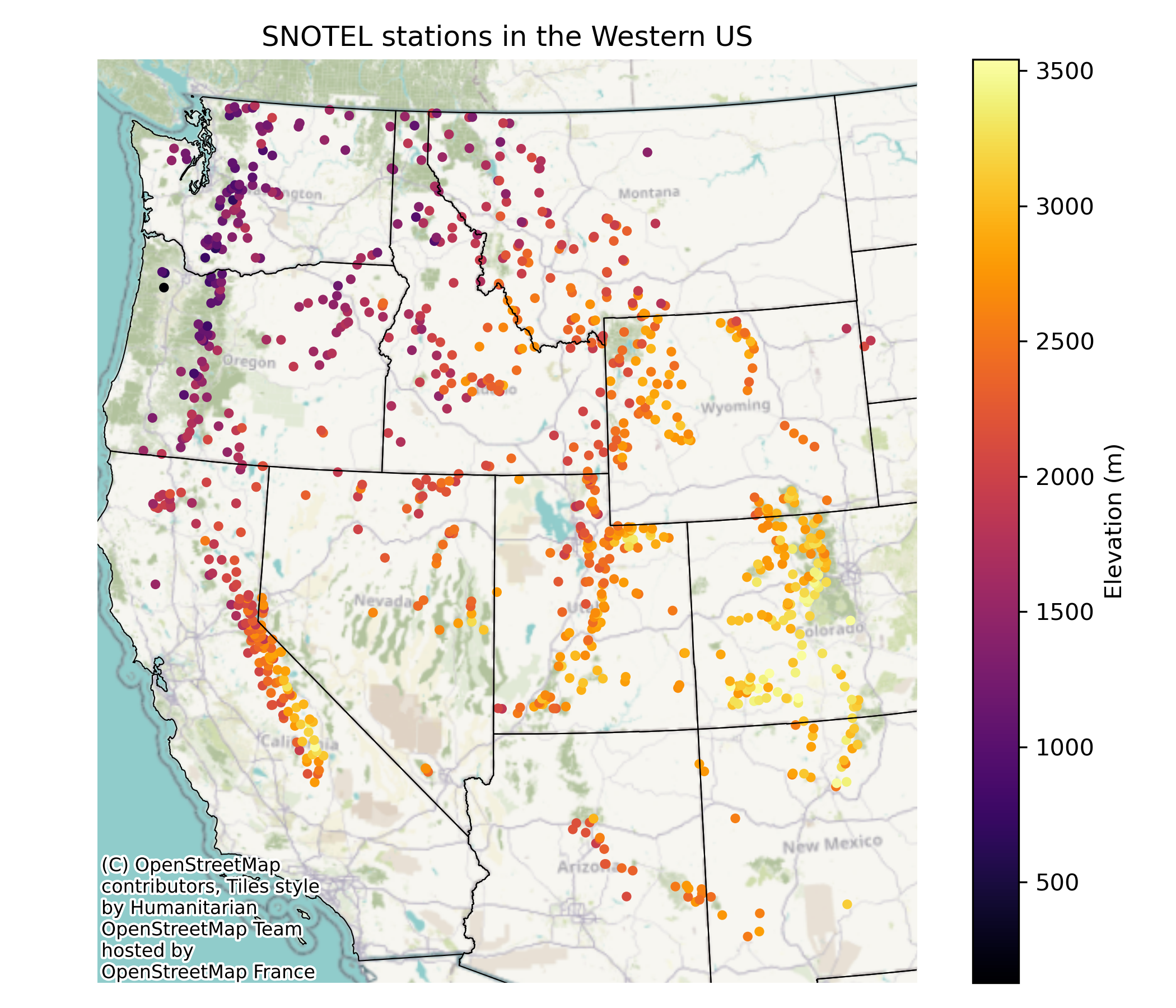
Print the station name, code, latitude, longitude, state, and elevation of the highest and lowest stations#
# STUDENT CODE HERE
Create wa_stations_gdf, a geodataframe of just the stations in Washington. Create a figure with three plots: a map of all of the stations (still excluding Alaska), a map of the Washington stations, and then one plot with their respective elevation histograms.#
To get the layout similar to the example output, maybe give subplot_mosaic a try!
wa_stations_gdf = all_stations_gdf[all_stations_gdf['state']=='Washington']
wa_stations_gdf
| name | network | elevation_m | latitude | longitude | state | HUC | mgrs | mountainRange | beginDate | endDate | csvData | geometry | |
|---|---|---|---|---|---|---|---|---|---|---|---|---|---|
| code | |||||||||||||
| 1231_WA_SNTL | Satus Pass | SNOTEL | 1207.008057 | 45.987968 | -120.677338 | Washington | 170701060301 | 10TFR | Columbia Plateau | 2012-08-23 00:00:00 | 2025-02-27 | True | POINT (-543481.686 506823.621) |
| 1129_WA_SNTL | Indian Rock | SNOTEL | 1633.728027 | 45.990768 | -120.807671 | Washington | 170701060301 | 10TFR | Columbia Plateau | 2008-10-01 00:00:00 | 2025-02-27 | True | POINT (-553456.824 507945.588) |
| 804_WA_SNTL | Surprise Lakes | SNOTEL | 1307.592041 | 46.094971 | -121.763451 | Washington | 170800020107 | 10TES | Cascade Range | 1978-10-01 00:00:00 | 2025-02-27 | True | POINT (-625678.614 525941.149) |
| 1109_WA_SNTL | Calamity | SNOTEL | 762.000000 | 45.903622 | -122.216331 | Washington | 170800020603 | 10TER | Cascade Range | 2008-08-21 13:00:00 | 2025-02-27 | True | POINT (-662408.042 507935.784) |
| 1104_WA_SNTL | Pepper Creek | SNOTEL | 652.271973 | 46.102421 | -121.955551 | Washington | 170800020111 | 10TES | Cascade Range | 2007-08-15 00:00:00 | 2025-02-27 | True | POINT (-640297.907 528148.262) |
| ... | ... | ... | ... | ... | ... | ... | ... | ... | ... | ... | ... | ... | ... |
| 1159_WA_SNTL | Gold Axe Camp | SNOTEL | 1633.728027 | 48.951599 | -118.986397 | Washington | 170200021204 | 11ULQ | Columbia Mountains | 2010-10-01 00:00:00 | 2025-02-27 | True | POINT (-393507.081 827717.25) |
| 1107_WA_SNTL | Buckinghorse | SNOTEL | 1484.375977 | 47.708599 | -123.457474 | Washington | 171100200501 | 10TDT | Olympic Mountains | 2008-06-19 00:00:00 | 2025-02-27 | True | POINT (-735115.743 718322.713) |
| 648_WA_SNTL | Mount Crag | SNOTEL | 1207.008057 | 47.763699 | -123.026001 | Washington | 171100180601 | 10TDT | Olympic Mountains | 1989-10-01 00:00:00 | 2025-02-27 | True | POINT (-702377.025 720918.663) |
| 943_WA_SNTL | Dungeness | SNOTEL | 1222.248047 | 47.872238 | -123.078796 | Washington | 171100200301 | 10TDU | Olympic Mountains | 1998-10-01 00:00:00 | 2025-02-27 | True | POINT (-705004.394 733374.132) |
| 974_WA_SNTL | Waterhole | SNOTEL | 1527.047974 | 47.944851 | -123.425941 | Washington | 171100200506 | 10TDU | Olympic Mountains | 1999-09-30 00:00:00 | 2025-02-27 | True | POINT (-729848.2 744242.973) |
74 rows × 13 columns
# STUDENT CODE HERE
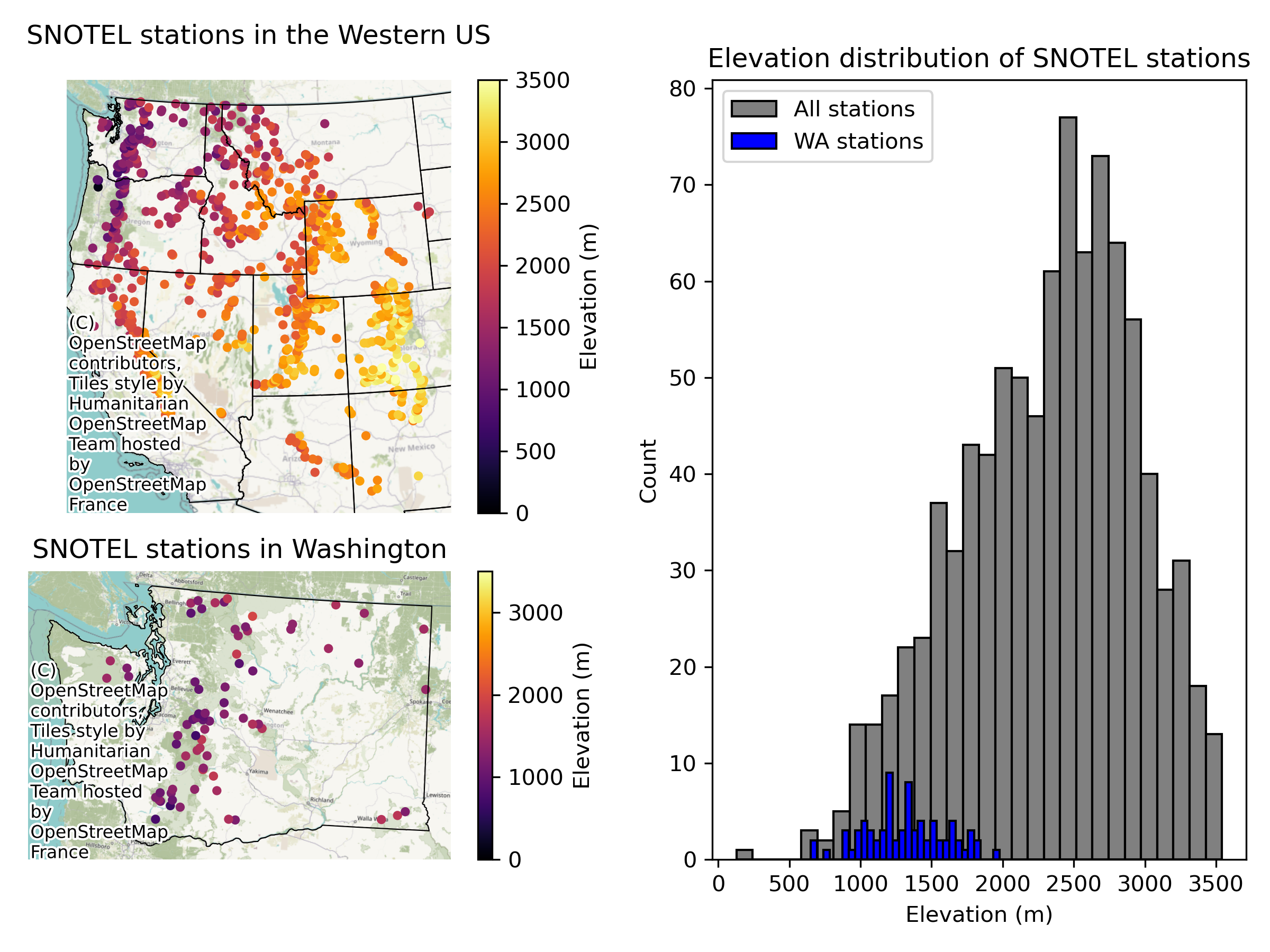
Written response: Imagine using traditional statistical tests to answer each of the following questions. For each, comment on whether you think spatial autocorrelation is a concern and why. For traditional statistics, what assumptions are violated due to spatial autocorrelation?#
Based on the SNOTEL station data, is the average elevation in Washington different from the rest of the Contiguous US?
Are Washington’s SNOTEL station elevations representative of the broader SNOTEL network?
STUDENT WRITTEN RESPONSE HERE
Part 2: Single site time series analysis and temporal autocorrelation (5 pts)#
Index into snotel_ds to load data from Paradise site (ID 679) on Mt. Rainer as paradise_snotel_ds#
snotel_ds = xr.open_dataset(f'{snotel_data_dir}/snotel_data.nc').load()
snotel_ds
<xarray.Dataset> Size: 1GB
Dimensions:        (station: 969, time: 24173)
Coordinates: (12/16)
  * time           (time) datetime64[ns] 193kB 1909-04-13 ... 2025-02-27
  * station        (station) <U12 47kB '1135_UT_SNTL' ... '915_ID_SNTL'
    name           (station) <U24 93kB 'Burts Miller Ranch' ... 'Schwartz Lake'
    network        (station) <U6 23kB 'SNOTEL' 'SNOTEL' ... 'SNOTEL' 'SNOTEL'
    elevation_m    (station) float64 8kB 2.438e+03 2.377e+03 ... 2.63e+03
    latitude       (station) float64 8kB 40.98 44.79 37.16 ... 40.28 42.3 44.85
    ...             ...
    mountainRange  (station) <U32 124kB '' ... 'Idaho-Bitterroot Rocky Mounta...
    beginDate      (station) datetime64[ns] 8kB 2009-10-01 ... 1995-09-26
    endDate        (station) datetime64[ns] 8kB 2025-02-27 ... 2025-02-27
    csvData        (station) bool 969B True True True True ... True True True
    WY             (time) int64 193kB 1909 1955 1955 1955 ... 2025 2025 2025
    DOWY           (time) int64 193kB 195 62 63 64 65 66 ... 146 147 148 149 150
Data variables:
    TAVG           (station, time) float64 187MB nan nan nan ... -4.6 -2.7 nan
    TMIN           (station, time) float64 187MB nan nan nan ... -6.8 -7.0 nan
    TMAX           (station, time) float64 187MB nan nan nan ... -0.1 4.0 nan
    SNWD           (station, time) float64 187MB nan nan nan ... 0.9398 0.9398
    WTEQ           (station, time) float64 187MB nan nan nan ... 0.2286 0.2286
PRCPSA (station, time) float64 187MB nan nan nan nan ... 0.0 nan nanstation_id = '679_WA_SNTL'
# STUDENT CODE HERE
<xarray.Dataset> Size: 2MB
Dimensions:        (time: 24173)
Coordinates: (12/16)
  * time           (time) datetime64[ns] 193kB 1909-04-13 ... 2025-02-27
    station        <U12 48B '679_WA_SNTL'
    name           <U24 96B 'Paradise'
    network        <U6 24B 'SNOTEL'
    elevation_m    float64 8B 1.564e+03
    latitude       float64 8B 46.78
    ...             ...
    mountainRange  <U32 128B 'Cascade Range'
    beginDate      datetime64[ns] 8B 1979-10-01
    endDate        datetime64[ns] 8B 2025-02-27
    csvData        bool 1B True
    WY             (time) int64 193kB 1909 1955 1955 1955 ... 2025 2025 2025
    DOWY           (time) int64 193kB 195 62 63 64 65 66 ... 146 147 148 149 150
Data variables:
    TAVG           (time) float64 193kB nan nan nan nan ... 1.3 -1.3 -2.5 nan
    TMIN           (time) float64 193kB nan nan nan nan ... -1.7 -3.7 -4.9 nan
    TMAX           (time) float64 193kB nan nan nan nan nan ... 3.2 3.0 -1.6 nan
    SNWD           (time) float64 193kB nan nan nan nan ... 2.972 nan 3.378
    WTEQ           (time) float64 193kB nan nan nan nan ... 1.331 1.374 1.372
PRCPSA (time) float64 193kB nan nan nan nan ... 0.0432 0.0025 nanHere we’ll use the .to_pandas() function to turn our xarray dataset into a pandas dataframe#
paradise_snotel_df = paradise_snotel_ds.to_pandas()[['SNWD', 'TAVG','PRCPSA','WY','DOWY']]
paradise_snotel_df
| SNWD | TAVG | PRCPSA | WY | DOWY | |
|---|---|---|---|---|---|
| time | |||||
| 1909-04-13 | NaN | NaN | NaN | 1909 | 195 |
| 1954-12-01 | NaN | NaN | NaN | 1955 | 62 |
| 1954-12-02 | NaN | NaN | NaN | 1955 | 63 |
| 1954-12-03 | NaN | NaN | NaN | 1955 | 64 |
| 1954-12-04 | NaN | NaN | NaN | 1955 | 65 |
| ... | ... | ... | ... | ... | ... |
| 2025-02-23 | 3.2512 | 1.8 | 0.0432 | 2025 | 146 |
| 2025-02-24 | 3.0734 | 1.3 | 0.0178 | 2025 | 147 |
| 2025-02-25 | 2.9718 | -1.3 | 0.0432 | 2025 | 148 |
| 2025-02-26 | NaN | -2.5 | 0.0025 | 2025 | 149 |
| 2025-02-27 | 3.3782 | NaN | NaN | 2025 | 150 |
24173 rows × 5 columns
Written response: You’ll notice we preserved the WY and DOWY columns. Read the water year wikipedia page. Why might water year and day of water year (DOWY) be useful for us when comparing snow hydrology data?#
STUDENT WRITTEN RESPONSE HERE
Plot snow depth vs day of water year, with colors representing average temperatures#
# STUDENT CODE HERE
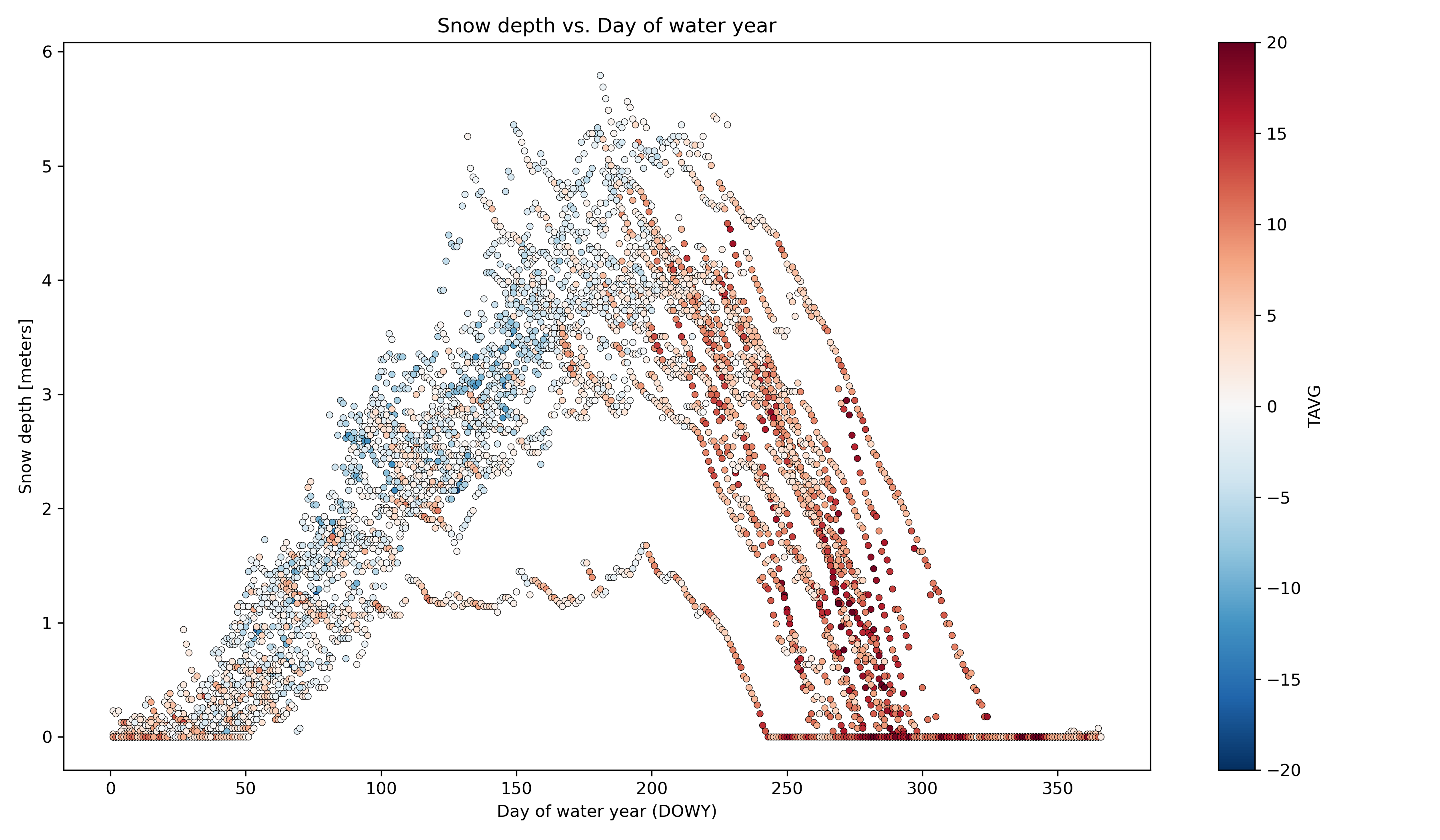
Written response: Answer the following by inspecting the graph above. What is the approximate average maximum snow depth, and around what day does this occur? Around what average temperatures does it seem that snow depth decreases the fastest, and around what day does this usually occur? Around what day does snow usually disappear? Approximately what day did the snow disappear earliest? Latest? Please report the dates as both DOWY and calendar dates.#
STUDENT WRITTEN RESPONSE HERE
Compute statistics for each day of water year, using values from all years#
Seems like a Pandas groupby/agg might work here
Include min, max, mean, and median
stat_list = ['count','min','max','mean','std','median']
# STUDENT CODE HERE
| count | min | max | mean | std | median | |
|---|---|---|---|---|---|---|
| DOWY | ||||||
| 1 | 19 | 0.0 | 0.2286 | 0.013368 | 0.052444 | 0.0 |
| 2 | 19 | 0.0 | 0.2032 | 0.010695 | 0.046617 | 0.0 |
| 3 | 19 | 0.0 | 0.2286 | 0.013368 | 0.052444 | 0.0 |
| 4 | 19 | 0.0 | 0.1270 | 0.012032 | 0.032093 | 0.0 |
| 5 | 19 | 0.0 | 0.1270 | 0.012032 | 0.033192 | 0.0 |
| ... | ... | ... | ... | ... | ... | ... |
| 362 | 19 | 0.0 | 0.0254 | 0.001337 | 0.005827 | 0.0 |
| 363 | 19 | 0.0 | 0.0254 | 0.001337 | 0.005827 | 0.0 |
| 364 | 19 | 0.0 | 0.0254 | 0.002674 | 0.008009 | 0.0 |
| 365 | 19 | 0.0 | 0.0762 | 0.005347 | 0.018117 | 0.0 |
| 366 | 5 | 0.0 | 0.0000 | 0.000000 | 0.000000 | 0.0 |
366 rows × 6 columns
What day of water year has the highest average snow depth, and what is that snow depth? What calendar day does this correspond to?#
Consider converting from DOWY to calendar date using
caldate = pd.to_datetime('2021-09-30')+pd.to_timedelta(DOWY, unit='D')And
calmonthday = caldate.strftime('%B %d')to convert from pandas datetime to Month / day string
# STUDENT CODE HERE
The day of highest average snow depth is DOWY 197, corresponding to a calendar date of April 15, with an average snow depth of 4.00 meters.
Create a plot of these aggregated dowy values, and add the current water year’s daily data as a scatter plot on top#
Your output independent variable (x-axis) should be day of water year (1-366), and dependent variable (y-axis) should be median value for that day of year, computed using aggregated values for all available years
You can add shaded regions for standard deviation using
ax.fill_between
# STUDENT CODE HERE
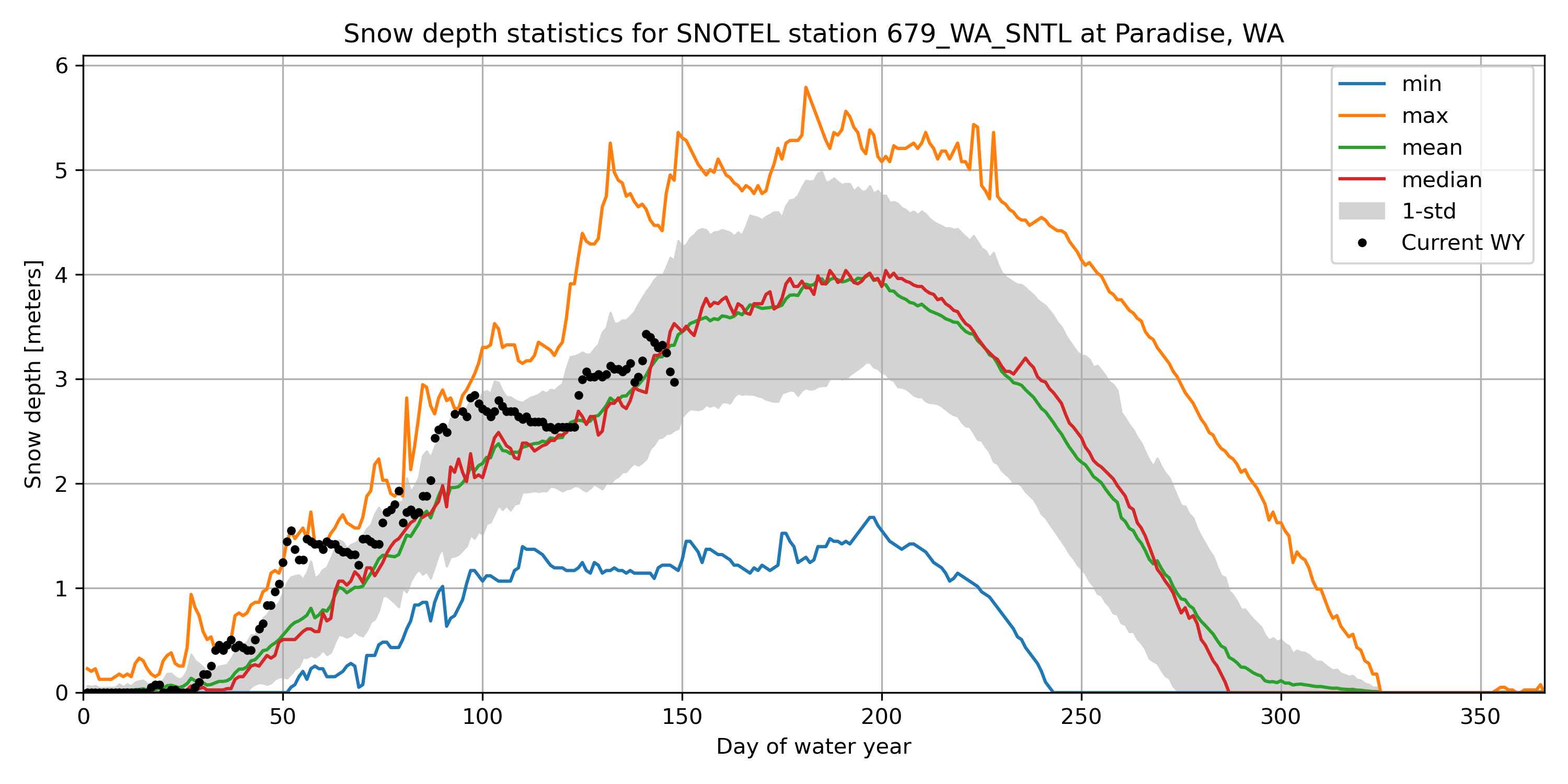
For most recent snow depth value in the record, what is the percentage of “normal”#
This will be the snow depth from whenever you ran the download script
Normal can be defined by long-term median for the same dowy across all years at the site
# STUDENT CODE HERE
Current snow depth (February 25, 2025 / DOWY 148): 2.97 meters
Long-term median on DOWY 148: 3.53 meters
Percent of normal snow depth on DOWY 148: 84.17%
Now let’s view the data as time-series plots#
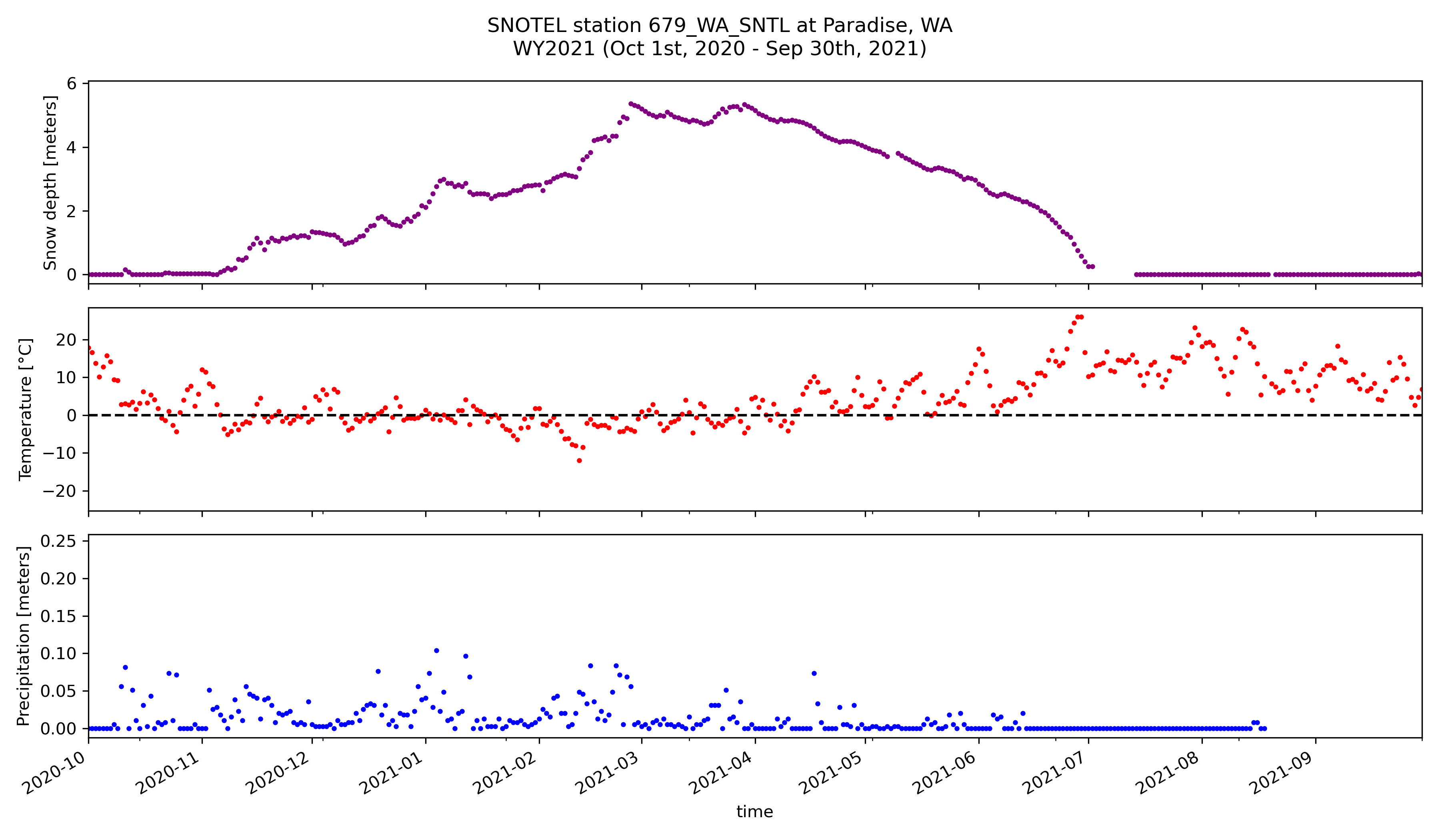
Create a figure to plot snow depth, temperature, and precipitation for water year 2021#
# STUDENT CODE HERE
Now we’ll calculate the temporal autocorrelation for WY 2021…#
autocorr_snwd = []
autocorr_tavg = []
autocorr_prcp = []
autocorr_lags = np.arange(1, 365)

paradise_snotel_wy2021_df = paradise_snotel_df.loc['2020-10-01':'2021-09-30']

for i in autocorr_lags:
    autocorr_snwd.append(paradise_snotel_wy2021_df['SNWD'].autocorr(lag=i))
    autocorr_tavg.append(paradise_snotel_wy2021_df['TAVG'].autocorr(lag=i))
    autocorr_prcp.append(paradise_snotel_wy2021_df['PRCPSA'].autocorr(lag=i))
/home/eric/miniconda3/envs/uwgda2025/lib/python3.12/site-packages/numpy/lib/_function_base_impl.py:2991: RuntimeWarning: Degrees of freedom <= 0 for slice
  c = cov(x, y, rowvar, dtype=dtype)
f,ax=plt.subplots(figsize=(12,7))
ax.plot(autocorr_lags, autocorr_snwd, marker='o', linestyle='-', color='purple', label='Snow depth',markersize=2)
ax.plot(autocorr_lags, autocorr_tavg, marker='o', linestyle='-', color='red', label='Temperature',markersize=2)
ax.plot(autocorr_lags, autocorr_prcp, marker='o', linestyle='-', color='blue', label='Precipitation',markersize=2)
ax.set_ylim([-1, 1])

ax.set_title('Autocorrelation of SNOTEL station data')
ax.set_xlabel('Lag (days)')
ax.set_ylabel('Autocorrelation')
ax.legend()

ax.axhline(0, color='k', linestyle='--')
ax.axhline(1, color='k', linestyle='--', alpha=0.5)
ax.axhline(-1, color='k', linestyle='--', alpha=0.5)
ax.grid(True)

f.tight_layout()

Written response: Compare and contrast the autocorrelation patterns among these three variables. What distinctive features do you observe in each pattern, and what physical or environmental processes might explain these differences? Also, describe the significance of the relative magnitudes of the curves, as well as the significance of the autocorrelation values at a lag distance of one day.#
STUDENT WRITTEN RESPONSE HERE
Now plot the same variables, but this time use the full time-series#
# STUDENT CODE HERE

Now we’ll calculate the temporal autocorrelation for the entire time-series…#
autocorr_snwd = []
autocorr_tavg = []
autocorr_prcp = []
autocorr_lags = np.arange(1, 365*3)

for i in autocorr_lags:
    autocorr_snwd.append(paradise_snotel_df['SNWD'].autocorr(lag=i))
    autocorr_tavg.append(paradise_snotel_df['TAVG'].autocorr(lag=i))
    autocorr_prcp.append(paradise_snotel_df['PRCPSA'].autocorr(lag=i))
f,ax=plt.subplots(figsize=(12,7))
ax.plot(autocorr_lags, autocorr_snwd, marker='o', linestyle='-', color='purple', label='Snow depth', markersize=2)
ax.plot(autocorr_lags, autocorr_tavg, marker='o', linestyle='-', color='red', label='Temperature',markersize=2)
ax.plot(autocorr_lags, autocorr_prcp, marker='o', linestyle='-', color='blue', label='Precipitation',markersize=2)
ax.set_ylim([-1, 1])

ax.set_title('Autocorrelation of SNOTEL station data')
ax.set_xlabel('Lag (days)')
ax.set_ylabel('Autocorrelation')
ax.legend()

ax.axhline(0, color='k', linestyle='--')
ax.axhline(1, color='k', linestyle='--', alpha=0.5)
ax.axhline(-1, color='k', linestyle='--', alpha=0.5)
ax.grid(True)

f.tight_layout()
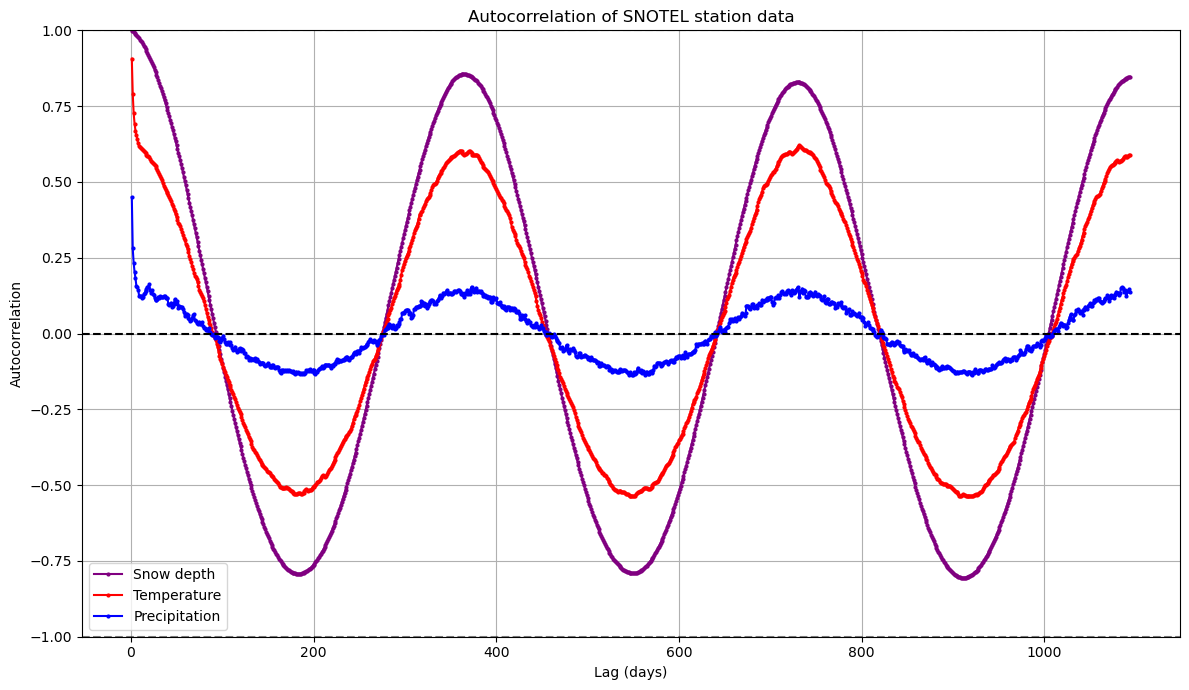
Written response: How might these autocorrelation patterns change at another SNOTEL site? Snow depth shows persistent positive autocorrelation over longer lags than precipitation. What implications does this have for the minimum timespan needed to characterize each process and the reliability of short-term vs. long-term forecasts?#
STUDENT WRITTEN RESPONSE HERE
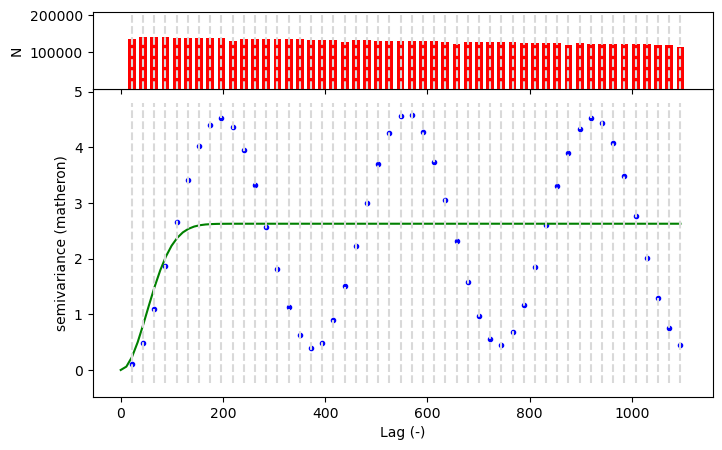
What would the variogram for snow depth look like here??#
Technically, we shouldn’t use a variogram here because it violates an assumption of stationarity - check out a great explainer here
Stationarity is violated because the mean and variance are are not constant across all time points, and the covariance between points does not only depend on distance between them
Think about how in the summer the mean and variability in snow depth are a lot lower than in the winter :)
But let’s plot it anyway to see what it would look like!
variogram_df = paradise_snotel_df["SNWD"].dropna()
delta_days = (pd.to_datetime(variogram_df.index)-pd.to_datetime(variogram_df.index.min())).days
variogram_df.index=delta_days
V = skg.Variogram(
    variogram_df.index.values,
    variogram_df.values,
    model="gaussian",
    maxlag=365*3,
    n_lags=50,
    use_nugget=True,
)
V.fit()

V.plot()
/home/eric/miniconda3/envs/uwgda2025/lib/python3.12/site-packages/skgstat/plotting/variogram_plot.py:123: UserWarning: FigureCanvasAgg is non-interactive, and thus cannot be shown
  fig.show()
print("Snow depth variogram model parameters:")
print(f"Model type: {V.describe()['model']}")
print(f"Nugget: {V.describe()['nugget']:.4f}")
print(f"Sill: {V.describe()['sill']:.4f}")
print(f"Range indicates that spatial dependence extends to approximately: {V.describe()['effective_range']:.4f} days")
Snow depth variogram model parameters:
Model type: gaussian
Nugget: 0.0000
Sill: 2.6271
Range indicates that spatial dependence extends to approximately: 144.6148 days
Written response: Compare the shape of the variogram plot with the autocorrelation function for snow depth. What similarities or differences do you observe, and what mathematical relationship connects these two representations of dependency? From just the variogram alone, how might you tell that the stationarity assumption has been violated?#
Hint: Remember that the blue points show the true variances at different lag distances, and the green line is supposed to be fit to these points
STUDENT WRITTEN RESPONSE HERE
Part 3: Western U.S. time-series analysis and correlation (4 pts)#
Now let’s take a look at the full SNOTEL time-series for the Western US
Inspect the SNOTEL dataset#
snotel_ds
<xarray.Dataset> Size: 1GB
Dimensions:        (station: 969, time: 24173)
Coordinates: (12/16)
  * time           (time) datetime64[ns] 193kB 1909-04-13 ... 2025-02-27
  * station        (station) <U12 47kB '1135_UT_SNTL' ... '915_ID_SNTL'
    name           (station) <U24 93kB 'Burts Miller Ranch' ... 'Schwartz Lake'
    network        (station) <U6 23kB 'SNOTEL' 'SNOTEL' ... 'SNOTEL' 'SNOTEL'
    elevation_m    (station) float64 8kB 2.438e+03 2.377e+03 ... 2.63e+03
    latitude       (station) float64 8kB 40.98 44.79 37.16 ... 40.28 42.3 44.85
    ...             ...
    mountainRange  (station) <U32 124kB '' ... 'Idaho-Bitterroot Rocky Mounta...
    beginDate      (station) datetime64[ns] 8kB 2009-10-01 ... 1995-09-26
    endDate        (station) datetime64[ns] 8kB 2025-02-27 ... 2025-02-27
    csvData        (station) bool 969B True True True True ... True True True
    WY             (time) int64 193kB 1909 1955 1955 1955 ... 2025 2025 2025
    DOWY           (time) int64 193kB 195 62 63 64 65 66 ... 146 147 148 149 150
Data variables:
    TAVG           (station, time) float64 187MB nan nan nan ... -4.6 -2.7 nan
    TMIN           (station, time) float64 187MB nan nan nan ... -6.8 -7.0 nan
    TMAX           (station, time) float64 187MB nan nan nan ... -0.1 4.0 nan
    SNWD           (station, time) float64 187MB nan nan nan ... 0.9398 0.9398
    WTEQ           (station, time) float64 187MB nan nan nan ... 0.2286 0.2286
PRCPSA (station, time) float64 187MB nan nan nan nan ... 0.0 nan nanCreate all_stations_snwd_df, a pandas dataframe of snow depth at all stations, with each row representing a day, and each column representing a station#
all_stations_snwd_df = snotel_ds['SNWD'].to_pandas().T
all_stations_snwd_df
| station | 1135_UT_SNTL | 448_MT_SNTL | TMR | 872_WY_SNTL | 773_CO_SNTL | MDW | 1224_UT_SNTL | 1109_WA_SNTL | 1045_WY_SNTL | 902_AZ_SNTL | ... | 310_AZ_SNTL | FOR | 1207_NV_SNTL | 349_MT_SNTL | 368_UT_SNTL | 644_WA_SNTL | 327_CO_SNTL | 417_NV_SNTL | 544_WY_SNTL | 915_ID_SNTL |
|---|---|---|---|---|---|---|---|---|---|---|---|---|---|---|---|---|---|---|---|---|---|
| time | |||||||||||||||||||||
| 1909-04-13 | NaN | NaN | NaN | NaN | NaN | NaN | NaN | NaN | NaN | NaN | ... | NaN | NaN | NaN | NaN | NaN | NaN | NaN | NaN | NaN | NaN |
| 1954-12-01 | NaN | NaN | NaN | NaN | NaN | NaN | NaN | NaN | NaN | NaN | ... | NaN | NaN | NaN | NaN | NaN | NaN | NaN | NaN | NaN | NaN |
| 1954-12-02 | NaN | NaN | NaN | NaN | NaN | NaN | NaN | NaN | NaN | NaN | ... | NaN | NaN | NaN | NaN | NaN | NaN | NaN | NaN | NaN | NaN |
| 1954-12-03 | NaN | NaN | NaN | NaN | NaN | NaN | NaN | NaN | NaN | NaN | ... | NaN | NaN | NaN | NaN | NaN | NaN | NaN | NaN | NaN | NaN |
| 1954-12-04 | NaN | NaN | NaN | NaN | NaN | NaN | NaN | NaN | NaN | NaN | ... | NaN | NaN | NaN | NaN | NaN | NaN | NaN | NaN | NaN | NaN |
| ... | ... | ... | ... | ... | ... | ... | ... | ... | ... | ... | ... | ... | ... | ... | ... | ... | ... | ... | ... | ... | ... |
| 2025-02-23 | 0.5334 | 0.6858 | 0.4826 | 0.5588 | 0.8636 | 3.5306 | 1.2700 | 0.0 | 0.4064 | 0.0 | ... | 0.0 | NaN | 0.7112 | 0.9144 | 1.1938 | 1.1176 | 1.1938 | 1.3716 | 1.9558 | 0.9144 |
| 2025-02-24 | 0.5080 | 0.7366 | 0.4572 | 0.5588 | 0.8636 | 3.4544 | 1.2192 | 0.0 | 0.3810 | 0.0 | ... | 0.0 | NaN | 0.7112 | 0.9144 | 1.1684 | 1.1176 | 1.1938 | 1.3462 | 1.9304 | 0.9398 |
| 2025-02-25 | 0.4572 | 0.7366 | 0.4318 | 0.5334 | 0.8636 | 3.4036 | 1.1684 | 0.0 | 0.3556 | 0.0 | ... | 0.0 | NaN | 0.6604 | 0.8890 | 1.1430 | 1.1430 | 1.1684 | 1.2954 | 1.9050 | 0.9398 |
| 2025-02-26 | 0.4572 | 0.7620 | 0.4318 | 0.5334 | 0.8636 | 3.3528 | 1.1430 | 0.0 | 0.3556 | 0.0 | ... | 0.0 | NaN | 0.6604 | 0.9144 | 1.1176 | 1.1430 | 1.1684 | 1.2700 | 1.9050 | 0.9398 |
| 2025-02-27 | 0.4572 | 0.7620 | 0.4064 | 0.5334 | 0.9906 | 3.3020 | 1.1430 | 0.0 | 0.3556 | 0.0 | ... | 0.0 | NaN | 0.6350 | 0.9144 | 1.1176 | 1.1430 | 1.1684 | 1.2700 | 1.8796 | 0.9398 |
24173 rows × 969 columns
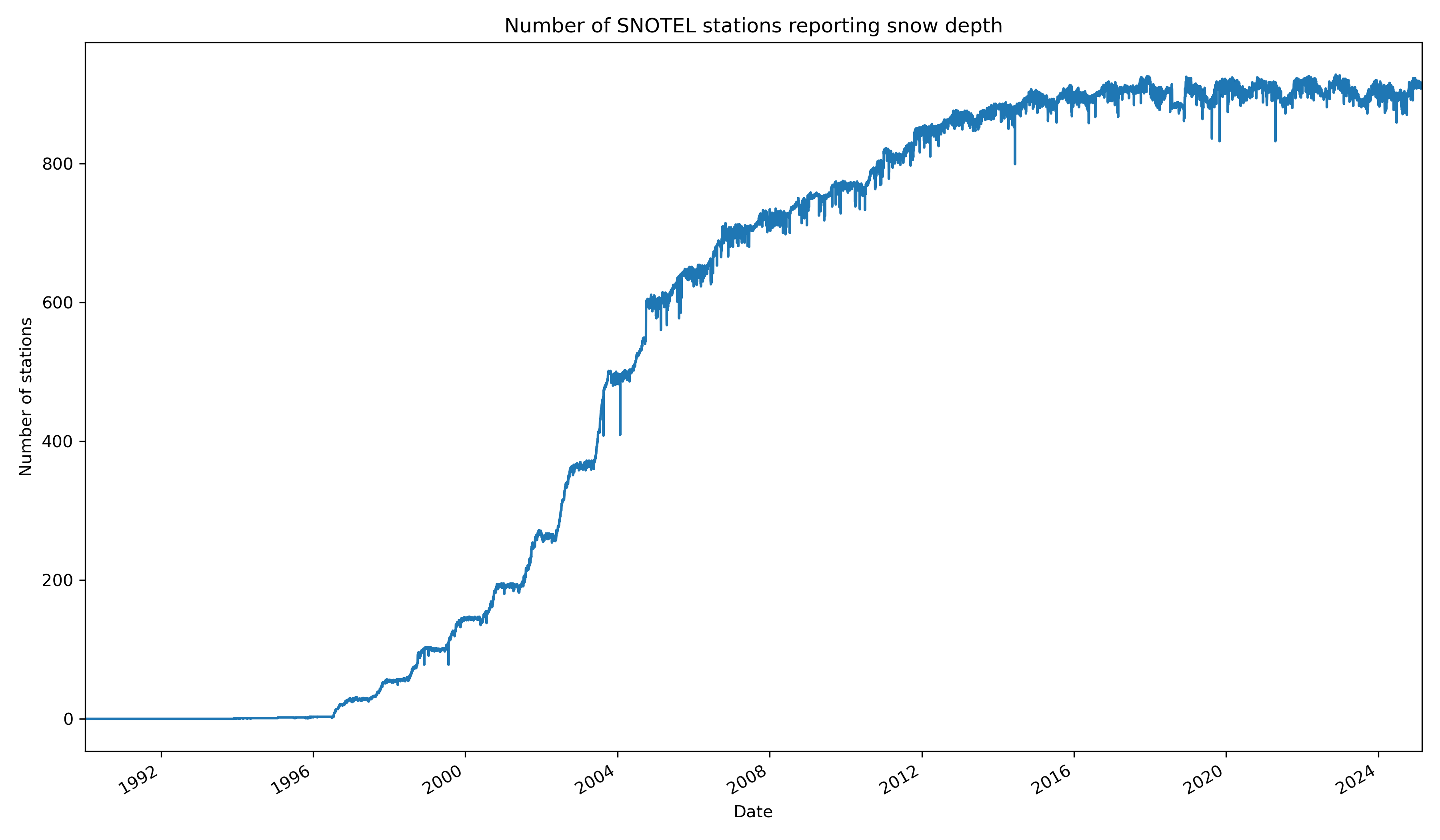
Create a plot of total operational stations vs time#
Limit your plot from January 1st, 1990 to February 24th, 2025
Hint: Remember the Pandas
countfunctionMake sure do the count over the right
axisof the DataFrame
Hint: If you’re plotting a dataframe with a DatetimeIndex, you can set your xlim like…
ax.set_xlim(['YYYY-MM-DD','YYYY-MM-DD'])
# STUDENT CODE HERE
Create a histogram of all snow depth values#
Use the Pandas
stackfunction here, otherwise you will end up with histograms for each stationConsider using log scale, as you likely have a spike for days with 0 snow depth (several months of each year!)
Adjust the x axis limits to realistic bounds for snow depth, excluding some spurious data
# STUDENT CODE HERE
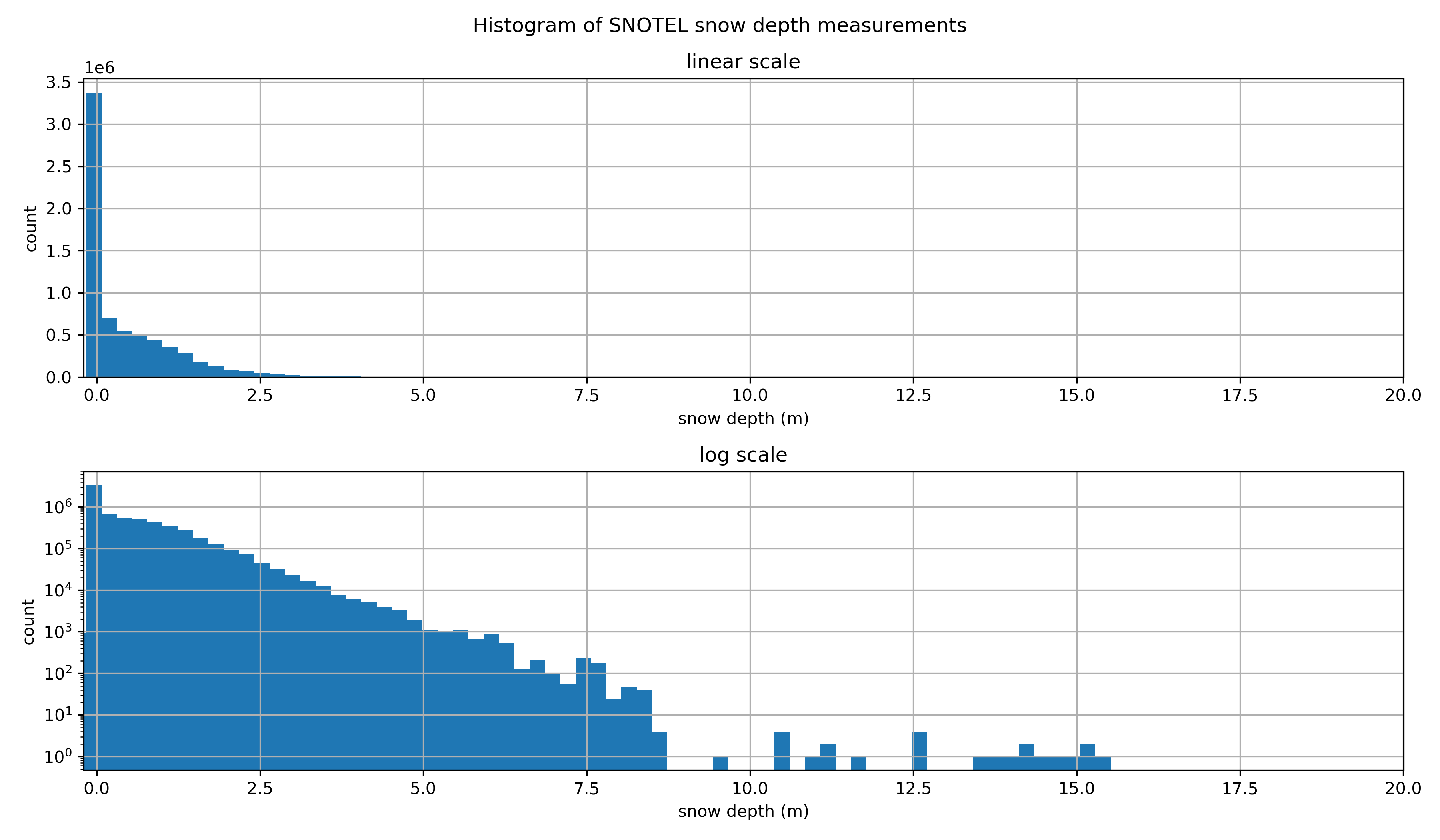
Hmmm, let’s filter out snow depth values less than one centimeter and greater than 10 meters. This will help with our aggregations later, as well as remove unlikely values.#
all_stations_snwd_df = all_stations_snwd_df.where((all_stations_snwd_df >= 0.01) & (all_stations_snwd_df <= 10.0))  # Filter out negative values and outliers
all_stations_snwd_df
| station | 1135_UT_SNTL | 448_MT_SNTL | TMR | 872_WY_SNTL | 773_CO_SNTL | MDW | 1224_UT_SNTL | 1109_WA_SNTL | 1045_WY_SNTL | 902_AZ_SNTL | ... | 310_AZ_SNTL | FOR | 1207_NV_SNTL | 349_MT_SNTL | 368_UT_SNTL | 644_WA_SNTL | 327_CO_SNTL | 417_NV_SNTL | 544_WY_SNTL | 915_ID_SNTL |
|---|---|---|---|---|---|---|---|---|---|---|---|---|---|---|---|---|---|---|---|---|---|
| time | |||||||||||||||||||||
| 1909-04-13 | NaN | NaN | NaN | NaN | NaN | NaN | NaN | NaN | NaN | NaN | ... | NaN | NaN | NaN | NaN | NaN | NaN | NaN | NaN | NaN | NaN |
| 1954-12-01 | NaN | NaN | NaN | NaN | NaN | NaN | NaN | NaN | NaN | NaN | ... | NaN | NaN | NaN | NaN | NaN | NaN | NaN | NaN | NaN | NaN |
| 1954-12-02 | NaN | NaN | NaN | NaN | NaN | NaN | NaN | NaN | NaN | NaN | ... | NaN | NaN | NaN | NaN | NaN | NaN | NaN | NaN | NaN | NaN |
| 1954-12-03 | NaN | NaN | NaN | NaN | NaN | NaN | NaN | NaN | NaN | NaN | ... | NaN | NaN | NaN | NaN | NaN | NaN | NaN | NaN | NaN | NaN |
| 1954-12-04 | NaN | NaN | NaN | NaN | NaN | NaN | NaN | NaN | NaN | NaN | ... | NaN | NaN | NaN | NaN | NaN | NaN | NaN | NaN | NaN | NaN |
| ... | ... | ... | ... | ... | ... | ... | ... | ... | ... | ... | ... | ... | ... | ... | ... | ... | ... | ... | ... | ... | ... |
| 2025-02-23 | 0.5334 | 0.6858 | 0.4826 | 0.5588 | 0.8636 | 3.5306 | 1.2700 | NaN | 0.4064 | NaN | ... | NaN | NaN | 0.7112 | 0.9144 | 1.1938 | 1.1176 | 1.1938 | 1.3716 | 1.9558 | 0.9144 |
| 2025-02-24 | 0.5080 | 0.7366 | 0.4572 | 0.5588 | 0.8636 | 3.4544 | 1.2192 | NaN | 0.3810 | NaN | ... | NaN | NaN | 0.7112 | 0.9144 | 1.1684 | 1.1176 | 1.1938 | 1.3462 | 1.9304 | 0.9398 |
| 2025-02-25 | 0.4572 | 0.7366 | 0.4318 | 0.5334 | 0.8636 | 3.4036 | 1.1684 | NaN | 0.3556 | NaN | ... | NaN | NaN | 0.6604 | 0.8890 | 1.1430 | 1.1430 | 1.1684 | 1.2954 | 1.9050 | 0.9398 |
| 2025-02-26 | 0.4572 | 0.7620 | 0.4318 | 0.5334 | 0.8636 | 3.3528 | 1.1430 | NaN | 0.3556 | NaN | ... | NaN | NaN | 0.6604 | 0.9144 | 1.1176 | 1.1430 | 1.1684 | 1.2700 | 1.9050 | 0.9398 |
| 2025-02-27 | 0.4572 | 0.7620 | 0.4064 | 0.5334 | 0.9906 | 3.3020 | 1.1430 | NaN | 0.3556 | NaN | ... | NaN | NaN | 0.6350 | 0.9144 | 1.1176 | 1.1430 | 1.1684 | 1.2700 | 1.8796 | 0.9398 |
24173 rows × 969 columns
Use the built-in .describe() function to determine look at some quick statistics. Which station has the highest mean snow depth? Which station has the greatest number of days with snow depth data?#
# STUDENT CODE HERE
| station | 1135_UT_SNTL | 448_MT_SNTL | TMR | 872_WY_SNTL | 773_CO_SNTL | MDW | 1224_UT_SNTL | 1109_WA_SNTL | 1045_WY_SNTL | 902_AZ_SNTL | ... | 310_AZ_SNTL | FOR | 1207_NV_SNTL | 349_MT_SNTL | 368_UT_SNTL | 644_WA_SNTL | 327_CO_SNTL | 417_NV_SNTL | 544_WY_SNTL | 915_ID_SNTL |
|---|---|---|---|---|---|---|---|---|---|---|---|---|---|---|---|---|---|---|---|---|---|
| count | 2570.000000 | 5801.000000 | 3859.000000 | 3950.000000 | 4949.000000 | 4021.000000 | 2729.000000 | 1402.000000 | 3968.000000 | 2159.000000 | ... | 2600.000000 | 0.0 | 1879.000000 | 4923.000000 | 4991.000000 | 4080.000000 | 5290.000000 | 4778.000000 | 2260.000000 | 2968.000000 |
| mean | 0.350263 | 0.578521 | 0.528608 | 0.412072 | 0.817902 | 1.339466 | 0.991549 | 0.310018 | 0.342663 | 0.208953 | ... | 0.373908 | NaN | 0.365887 | 0.563284 | 1.015669 | 0.671158 | 0.961167 | 0.860378 | 1.096830 | 0.568479 |
| std | 0.201622 | 0.320822 | 0.811378 | 0.272422 | 0.538385 | 1.431758 | 0.595782 | 0.251574 | 0.204886 | 0.192829 | ... | 0.291448 | NaN | 0.279400 | 0.336501 | 0.584000 | 0.395396 | 0.581579 | 0.512492 | 0.626058 | 0.331571 |
| min | 0.025400 | 0.025400 | 0.025400 | 0.025400 | 0.025400 | 0.025400 | 0.025400 | 0.025400 | 0.025400 | 0.025400 | ... | 0.025400 | NaN | 0.025400 | 0.025400 | 0.025400 | 0.025400 | 0.025400 | 0.025400 | 0.025400 | 0.025400 |
| 25% | 0.203200 | 0.304800 | 0.025400 | 0.177800 | 0.330200 | 0.076200 | 0.482600 | 0.082550 | 0.177800 | 0.050800 | ... | 0.127000 | NaN | 0.127000 | 0.279400 | 0.533400 | 0.355600 | 0.482600 | 0.457200 | 0.558800 | 0.279400 |
| 50% | 0.355600 | 0.609600 | 0.076200 | 0.406400 | 0.812800 | 0.939800 | 1.016000 | 0.254000 | 0.355600 | 0.152400 | ... | 0.355600 | NaN | 0.279400 | 0.558800 | 1.016000 | 0.635000 | 0.965200 | 0.863600 | 1.168400 | 0.584200 |
| 75% | 0.508000 | 0.812800 | 0.685800 | 0.609600 | 1.219200 | 2.184400 | 1.371600 | 0.457200 | 0.482600 | 0.304800 | ... | 0.533400 | NaN | 0.584200 | 0.812800 | 1.371600 | 0.965200 | 1.371600 | 1.219200 | 1.549400 | 0.812800 |
| max | 1.041400 | 1.422400 | 4.572000 | 1.422400 | 2.336800 | 7.010400 | 3.048000 | 1.143000 | 1.092200 | 1.193800 | ... | 1.828800 | NaN | 1.244600 | 1.498600 | 2.692400 | 1.828800 | 2.971800 | 2.819400 | 2.819400 | 1.397000 |
8 rows × 969 columns
# STUDENT CODE HERE
The station with the highest average snow depth is LOS with an average snow depth of 3.93 meters.
The station with the greatest number of days with snow depth data is 347_MT_SNTL with 8098 days.
Temporal correlation of snow depth for nearby stations#
Can use Paradise (‘SNOTEL:679_WA_SNTL’) and nearby station identified on the labeled folium plot above
Plot the time series for all stations
Can also use dropna here, but careful about methodology (
anyvsall, vsthresh)
#Paradise and nearby sites
site1 = '679_WA_SNTL'
site2 = '1085_WA_SNTL'
site3 = '1257_WA_SNTL'
site4 = '941_WA_SNTL'
site5 = '642_WA_SNTL'

site_list = [site1,site2,site3,site4,site5]
color_list = ['C%i' % i for i in range(len(site_list))]
nearby_gdf = all_stations_gdf.loc[site_list]
nearby_gdf
| name | network | elevation_m | latitude | longitude | state | HUC | mgrs | mountainRange | beginDate | endDate | csvData | geometry | |
|---|---|---|---|---|---|---|---|---|---|---|---|---|---|
| code | |||||||||||||
| 679_WA_SNTL | Paradise | SNOTEL | 1563.624023 | 46.782650 | -121.747650 | Washington | 171100150104 | 10TES | Cascade Range | 1979-10-01 00:00:00 | 2025-02-27 | True | POINT (-617392.713 602381.91) |
| 1085_WA_SNTL | Cayuse Pass | SNOTEL | 1597.151978 | 46.869541 | -121.534302 | Washington | 171100140301 | 10TFS | Cascade Range | 2006-10-01 00:00:00 | 2025-02-27 | True | POINT (-600380.071 610578.193) |
| 1257_WA_SNTL | Skate Creek | SNOTEL | 1149.095947 | 46.643360 | -121.830437 | Washington | 170800040505 | 10TES | Cascade Range | 2014-10-15 12:00:00 | 2025-02-27 | True | POINT (-625102.882 587466.084) |
| 941_WA_SNTL | Mowich | SNOTEL | 963.168030 | 46.928329 | -121.952316 | Washington | 171100140105 | 10TES | Cascade Range | 1998-09-30 00:00:00 | 2025-02-27 | True | POINT (-631339.042 620033.925) |
| 642_WA_SNTL | Morse Lake | SNOTEL | 1648.968018 | 46.905849 | -121.482697 | Washington | 170300020106 | 10TFS | Cascade Range | 1978-10-01 00:00:00 | 2025-02-27 | True | POINT (-596119.386 614268.382) |
f, axa = plt.subplots(1,2,figsize=(15,5))

#Plot the points on a map
nearby_gdf.plot(facecolor=color_list, edgecolor='k', ax=axa[0])
#Prepare list of tuples of (x,y,label,color) to use for annotation labels
annotation_tuples = zip(nearby_gdf['geometry'].x, nearby_gdf['geometry'].y, nearby_gdf.index.str.split('_').str[0], color_list)
#Loop through the tuples and add annotations to the map
for x, y, label, c in annotation_tuples:
    axa[0].annotate(label, xy=(x,y), xytext=(0, -15), ha='center', textcoords="offset points", color=c, \
                    bbox=dict(boxstyle="square",fc='w',alpha=0.7))


axa[0].set_title('SNOTEL stations near Paradise, WA')
axa[0].set_aspect('equal')
axa[0].axis('off')

axa[1].set_title('Snow depth time series')
axa[1].set_ylabel('Snow depth (m)')
axa[1].set_xlabel('Date')


#Add the basemap
ctx.add_basemap(ax=axa[0], crs=nearby_gdf.crs, source=ctx.providers.Esri.NatGeoWorldMap, alpha=0.7, attribution=False)

#Plot the time series
all_stations_snwd_df[site_list].dropna(thresh=2).plot(ax=axa[1])
#all_stations_snwd_df[site_list].dropna(how='all').plot(ax=axa[1])
f.tight_layout()
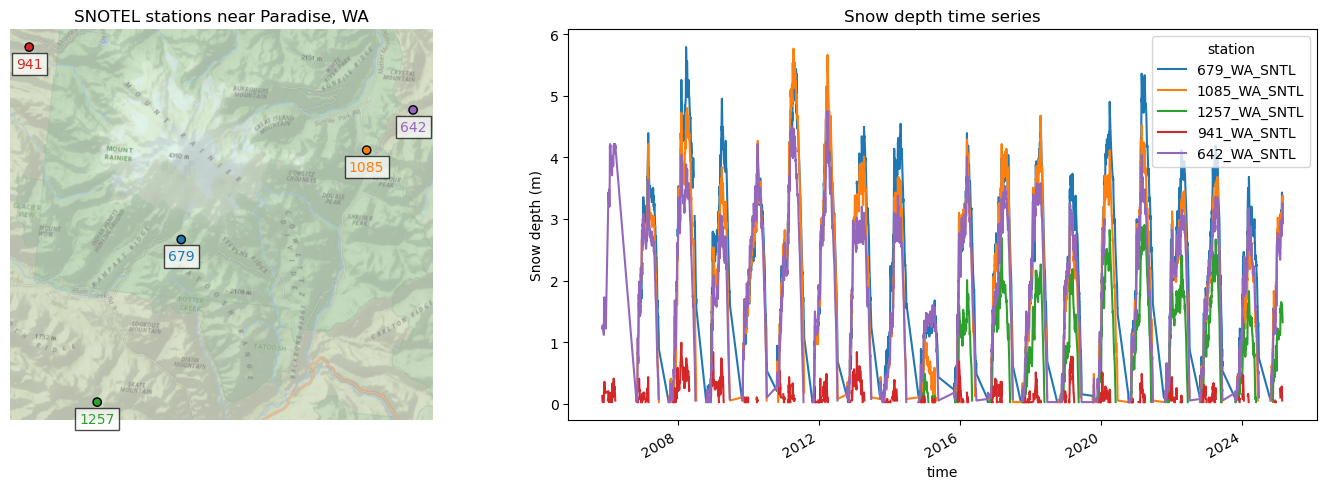
Now we’ll use .corr() to calculate the correlation values for different combinations of stations, and seaborn’s heatmap function to plot the correlation matrix#
#The Pandas `corr` should properly handle nans
snwd_corr = all_stations_snwd_df[site_list].corr()
snwd_corr
| station | 679_WA_SNTL | 1085_WA_SNTL | 1257_WA_SNTL | 941_WA_SNTL | 642_WA_SNTL |
|---|---|---|---|---|---|
| station | |||||
| 679_WA_SNTL | 1.000000 | 0.946617 | 0.878109 | 0.397001 | 0.916370 |
| 1085_WA_SNTL | 0.946617 | 1.000000 | 0.890231 | 0.350175 | 0.958519 |
| 1257_WA_SNTL | 0.878109 | 0.890231 | 1.000000 | 0.350870 | 0.861648 |
| 941_WA_SNTL | 0.397001 | 0.350175 | 0.350870 | 1.000000 | 0.281228 |
| 642_WA_SNTL | 0.916370 | 0.958519 | 0.861648 | 0.281228 | 1.000000 |
sns.heatmap(snwd_corr, cmap='RdBu', vmin=-1, vmax=1, square=True);

How does the correlation coefficient change with distance?#
Select the Paradise station as your reference station
ref_site = '679_WA_SNTL'
equidist_crs = 'ESRI:102005'
Compute the following…#
corr_with_ref_site_dfCorrelation score with your reference station
dist_from_ref_site_km_dfDistance in km from your reference station
Hint: Try geopandas
.distancefunction we used in lab05Use the equidistant crs provided above for the distance calculation
elev_diff_from_ref_site_m_dfElevation difference of the sites minus the reference site
# STUDENT CODE HERE
all_stations_gdf['corr_with_ref_site'] = corr_with_ref_site_df
all_stations_gdf['dist_from_ref_site_km'] = dist_from_ref_site_km_df
all_stations_gdf['elev_diff_from_ref_site_m'] = elev_diff_from_ref_site_m_df
Create a map with values representing correlation with the reference site#
# STUDENT CODE HERE
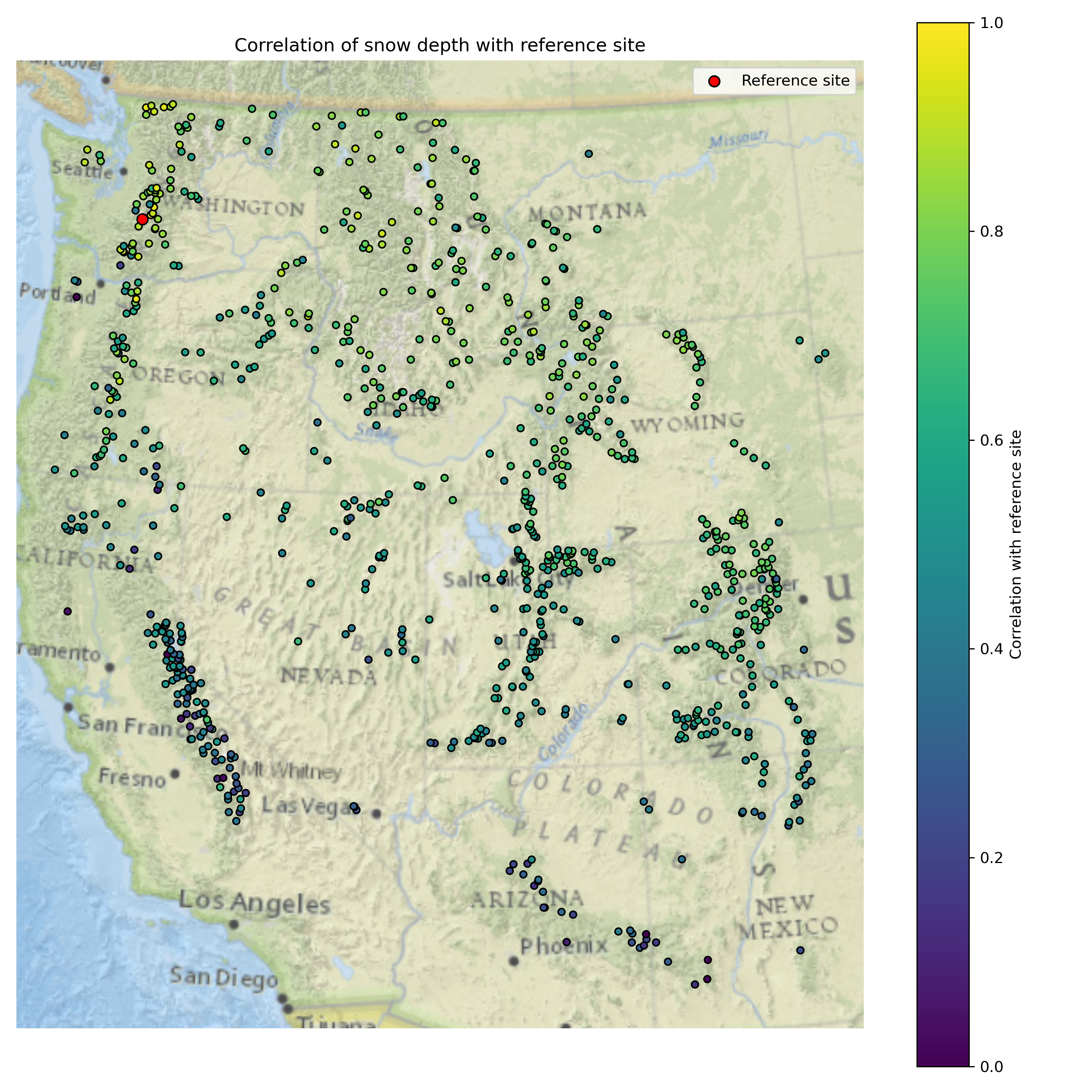
Written response: How does the correlation score vary with distance from the reference site? How does this relate to Tobler’s first law and the idea of spatial autocorrelation?#
STUDENT WRITTEN RESPONSE HERE
Create a plot of correlation scores with the reference site, with distance from site on the x-axis, and elevation difference from reference site on the y-axis#
# STUDENT CODE HERE
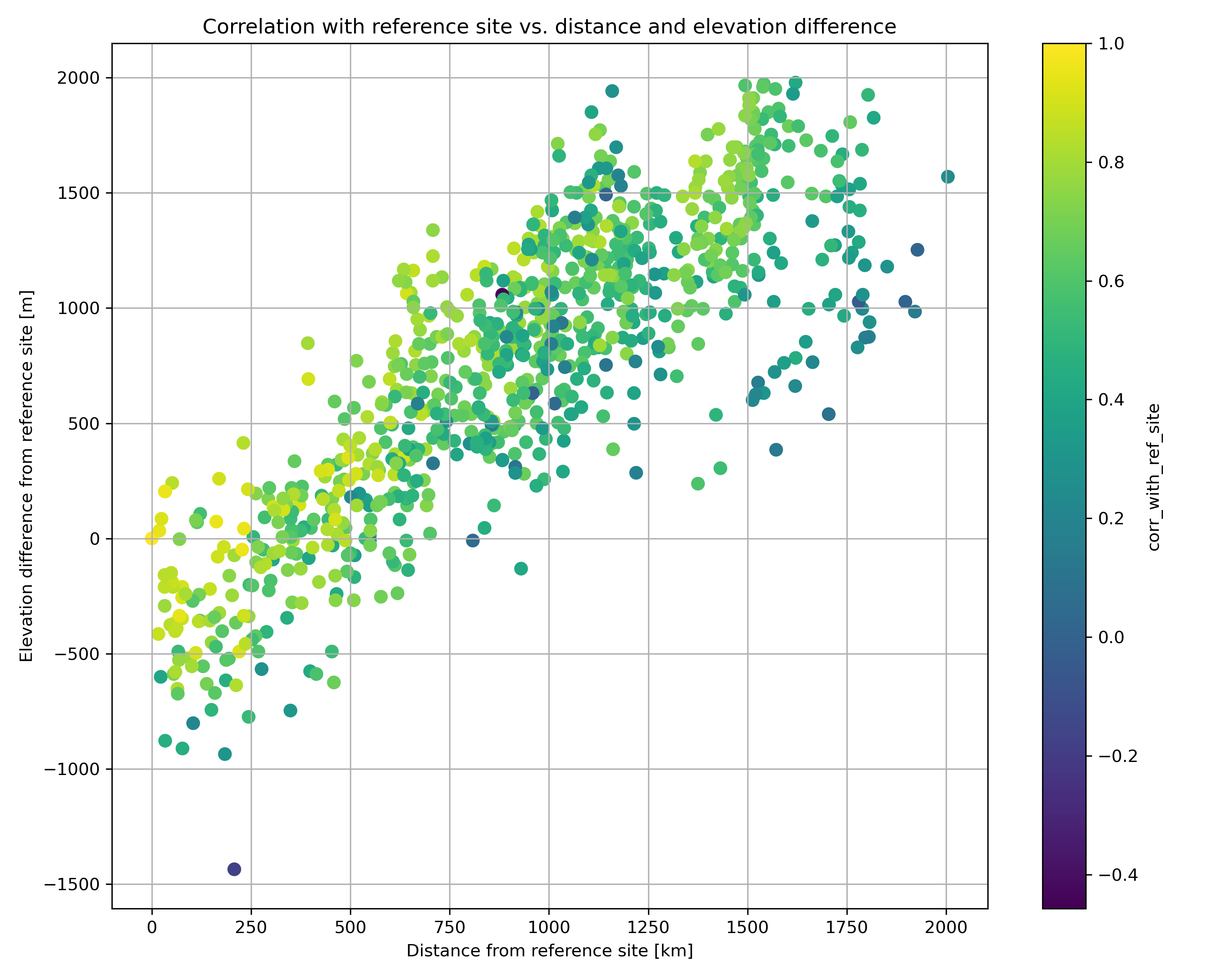
Written response: If our reference station at Paradise broke, yet you needed to know the snow depth there, what factors would you consider when choosing a different site to use as a proxy?#
STUDENT WRITTEN RESPONSE HERE
Part 4: Western U.S. long-term snow depth statistics (3 pts)#
Now that we’ve analyzed temporal variability, let’s look at long-term aggregations. We previously filtered out snow depths less than 1 centimeter and greater than 10 meters which improve some of these calculations.
At each site, calculate…#
the long-term median snow depth
the long-term max snow depth
the 2024 water year max snow depth
recent snow depth (2025-02-23)
percent normal snow depth (2025-02-23)
# STUDENT CODE HERE
# STUDENT CODE HERE
Plot the variables you just calculated!#
# STUDENT CODE HERE
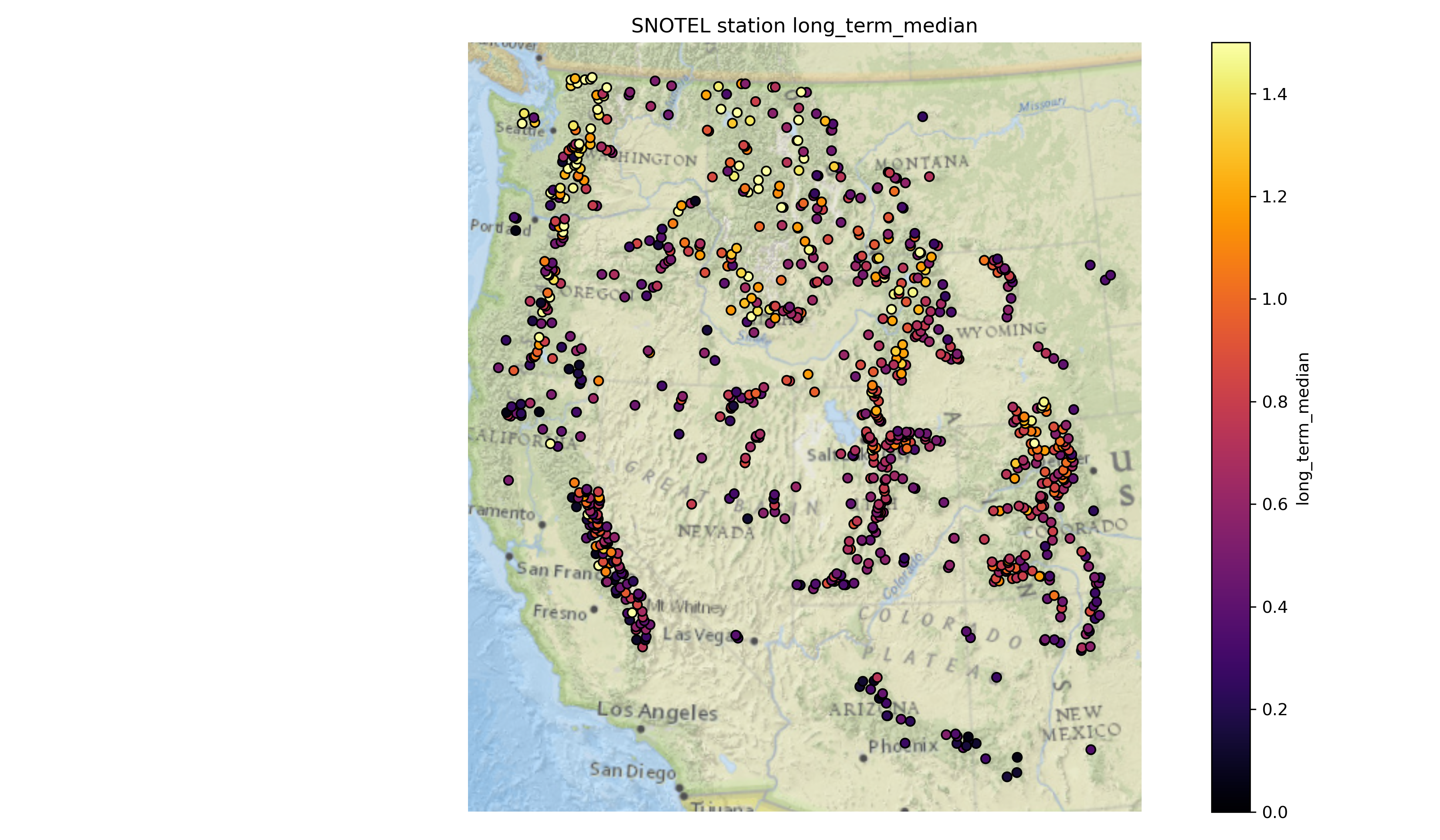
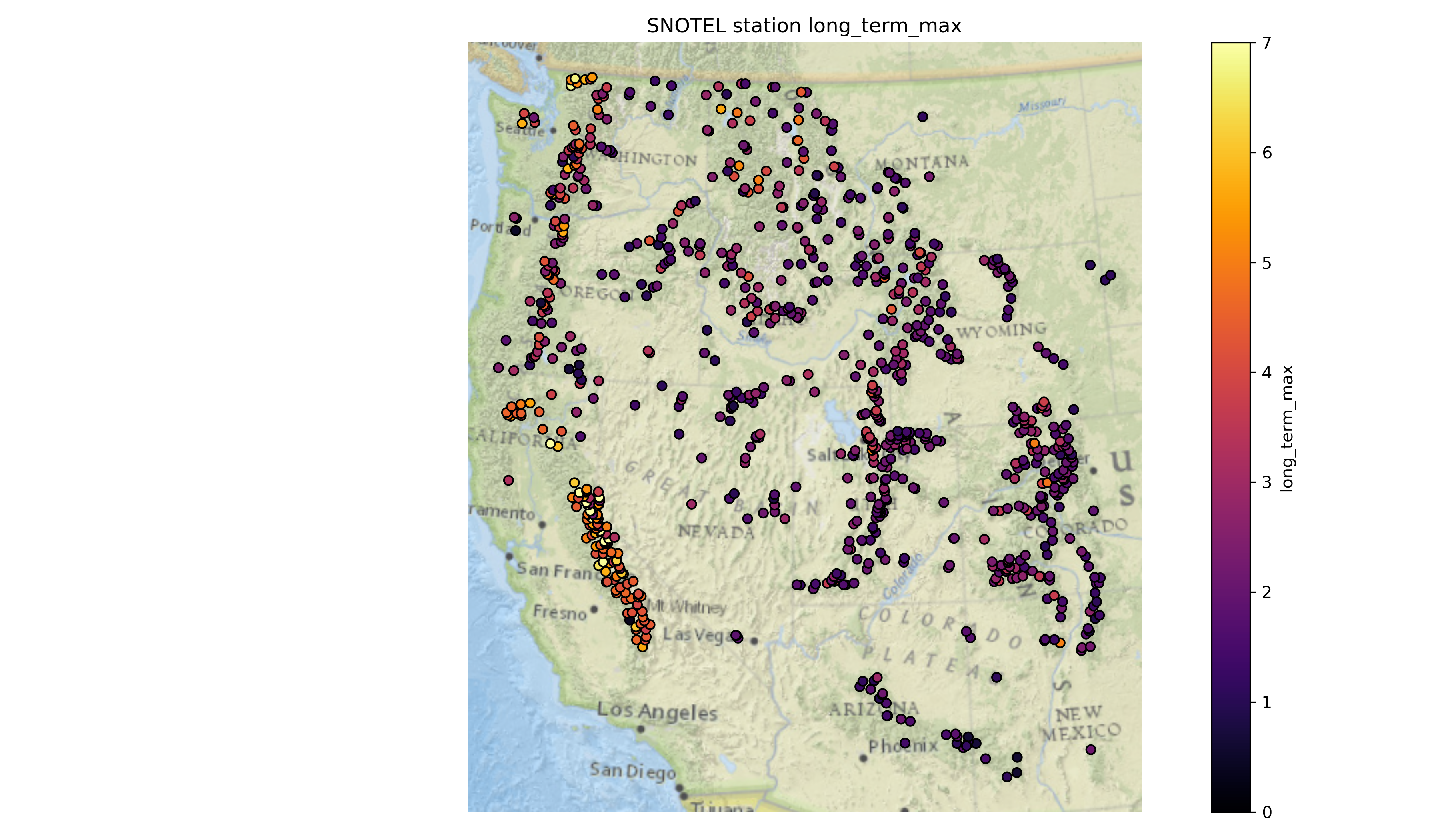
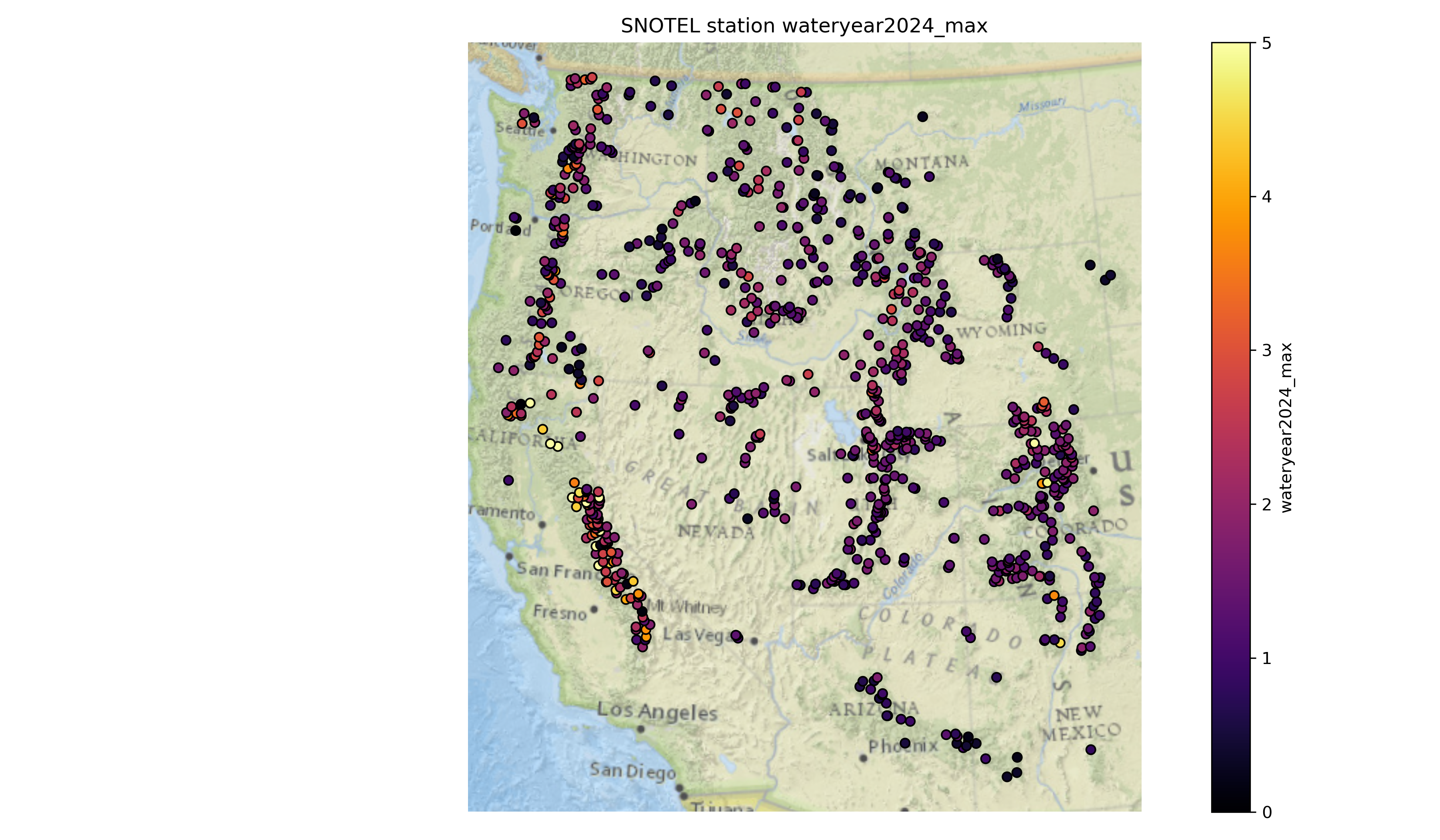
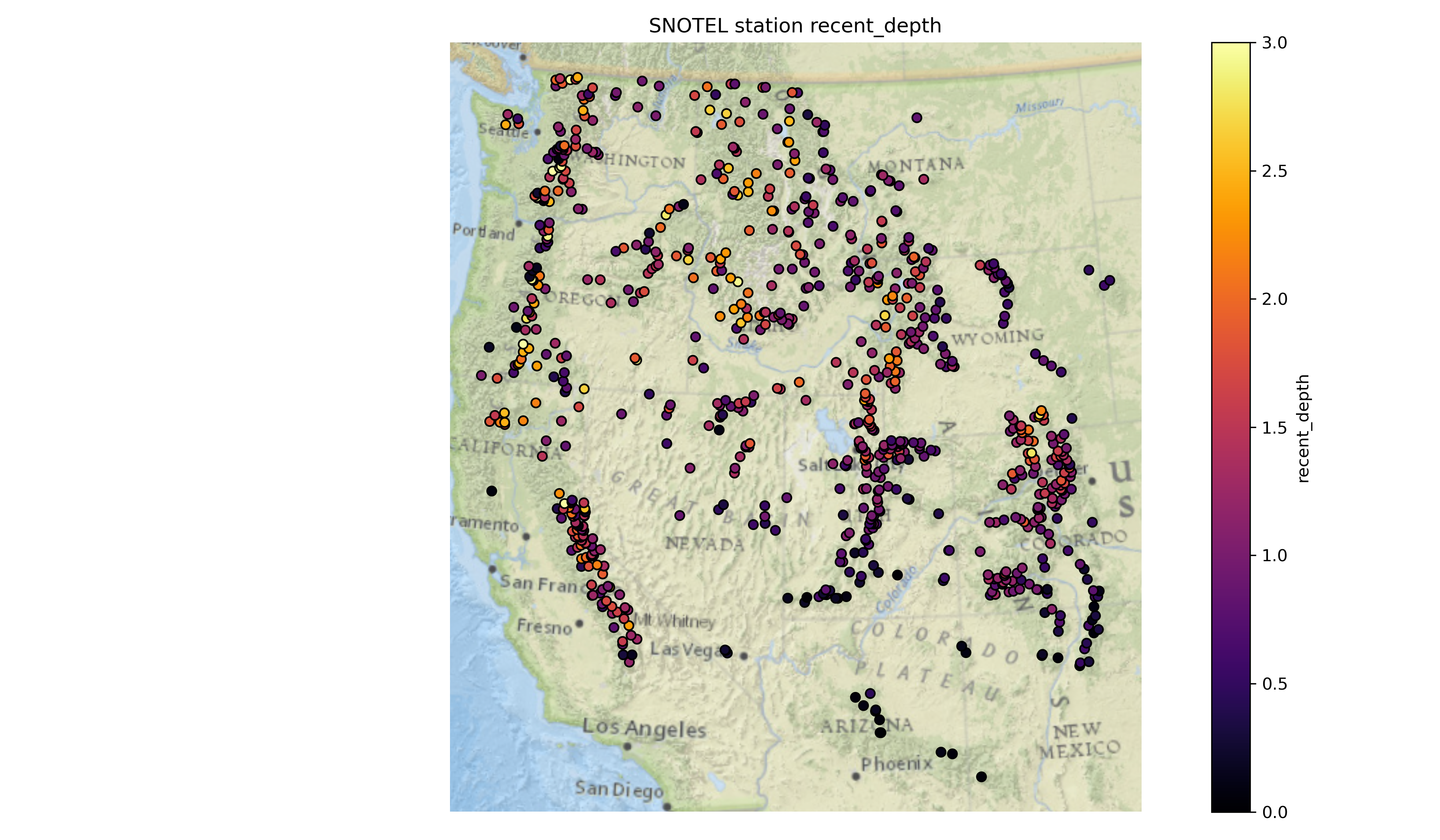
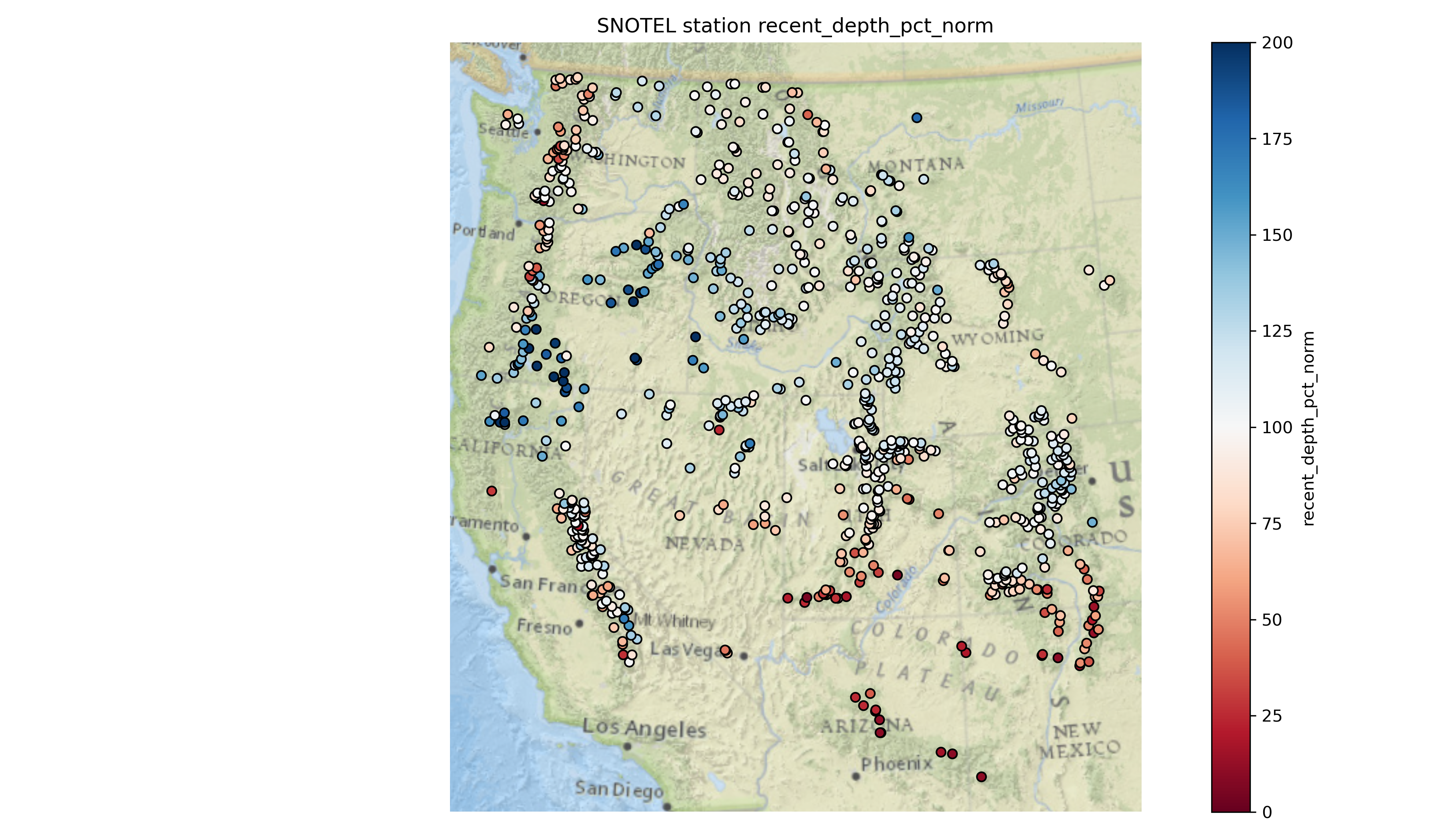
Written response: According to the percent of normal snow depth plot, what areas currently have a lower snow depth value than usual for this time of year? What areas have higher values than usual?#
STUDENT WRITTEN RESPONSE HERE
Part 5: Spatial autocorrelation and interpolation (4 pts)#
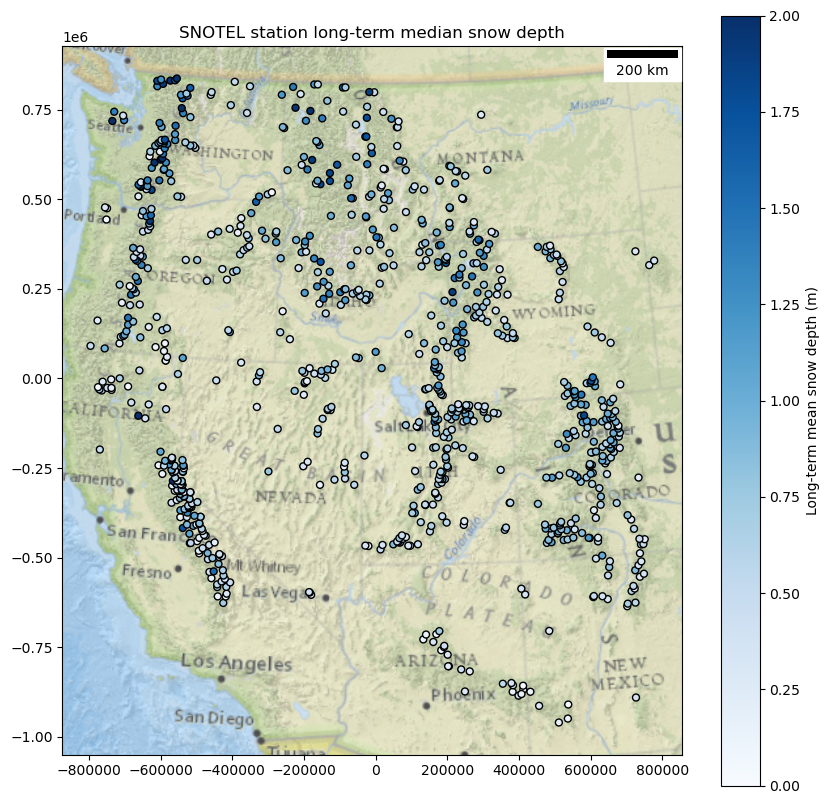
For this part, you’ll want to refer back to the module 08 demo. Let’s take a look at the long-term median snow depth…
# Let's quickly remove stations with no long term median value
stations_filtered_gdf = all_stations_gdf[['long_term_median','geometry']].dropna()
f,ax=plt.subplots(figsize=(10,10))
stations_filtered_gdf.plot(ax=ax,
                      column='long_term_median',
                      cmap='Blues',
                      legend=True,
                      legend_kwds={'label': 'Long-term mean snow depth (m)'},
                      edgecolor='k',
                      markersize=25,
                      vmin=0,
                      vmax=2)
ax.add_artist(ScaleBar(1, location='upper right', units='m'))
ctx.add_basemap(ax, crs=stations_filtered_gdf.crs, source=ctx.providers.Esri.NatGeoWorldMap, alpha=0.7, attribution=False)
ax.set_title('SNOTEL station long-term median snow depth')
Text(0.5, 1.0, 'SNOTEL station long-term median snow depth')
Check for autocorrelation using Global Moran’s I#
Try two different ways of specifying your weights / connectivity!
y = stations_filtered_gdf['long_term_median'].values

k = 8  # Number of neighbors
w = weights.KNN.from_dataframe(stations_filtered_gdf, k=k)

# or define w based on distance
dist_threshold = 100*1000
w = weights.distance.DistanceBand.from_dataframe(stations_filtered_gdf, threshold=dist_threshold)

w.transform = 'r'
('WARNING: ', '933_NM_SNTL', ' is an island (no neighbors)')
('WARNING: ', '1034_NM_SNTL', ' is an island (no neighbors)')
('WARNING: ', '917_MT_SNTL', ' is an island (no neighbors)')
('WARNING: ', 'NLS', ' is an island (no neighbors)')
/home/eric/miniconda3/envs/uwgda2025/lib/python3.12/site-packages/libpysal/weights/util.py:826: UserWarning: The weights matrix is not fully connected:
 There are 13 disconnected components.
 There are 4 islands with ids: 933_NM_SNTL, 1034_NM_SNTL, 917_MT_SNTL, NLS.
  w = W(neighbors, weights, ids, **kwargs)
/home/eric/miniconda3/envs/uwgda2025/lib/python3.12/site-packages/libpysal/weights/distance.py:844: UserWarning: The weights matrix is not fully connected:
 There are 13 disconnected components.
 There are 4 islands with ids: 933_NM_SNTL, 1034_NM_SNTL, 917_MT_SNTL, NLS.
  W.__init__(
# STUDENT CODE HERE
Written response: What did you calculate for your Global Moran’s I, and how do you interpret your results?#
STUDENT WRITTEN RESPONSE HERE
Now calculate Local Moran’s I#
# STUDENT CODE HERE
Make a scatterplot for Moran’s I#
# STUDENT CODE HERE

Plot your Local Moran’s I clusters on a map#
# STUDENT CODE HERE
# STUDENT CODE HERE
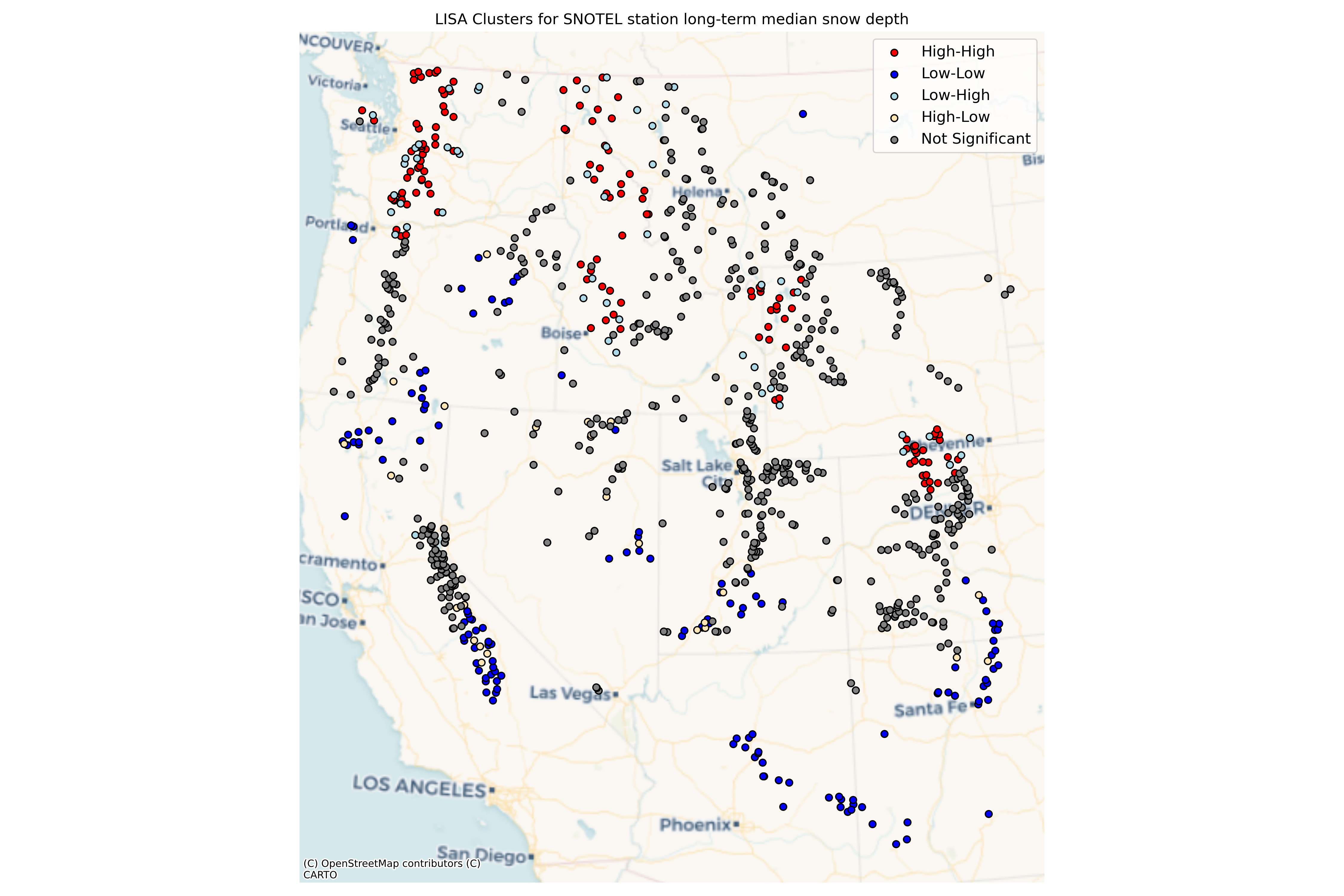
# Calculate percentage of each cluster type
total_sig = sum(stations_filtered_lisa['significant'])
for cluster_type in ['High-High', 'Low-Low', 'Low-High', 'High-Low']:
    count = sum(stations_filtered_lisa['cluster_type'] == cluster_type)
    percent = count / total_sig * 100 if total_sig > 0 else 0
    print(f"{cluster_type}: {count} points ({percent:.1f}% of significant clusters)")

# Interpret results
print("\nInterpretation of LISA clusters:")
print("- High-High clusters (hotspots): Areas with high snow depth surrounded by areas with high snow depth")
print("- Low-Low clusters (coldspots): Areas with low snow depth surrounded by areas with low snow depth")
print("- Low-High clusters: Areas with low snow depth surrounded by areas with high snow depth")
print("- High-Low clusters: Areas with high snow depth surrounded by areas with low snow depth")
High-High: 132 points (37.9% of significant clusters)
Low-Low: 139 points (39.9% of significant clusters)
Low-High: 50 points (14.4% of significant clusters)
High-Low: 27 points (7.8% of significant clusters)

Interpretation of LISA clusters:
- High-High clusters (hotspots): Areas with high snow depth surrounded by areas with high snow depth
- Low-Low clusters (coldspots): Areas with low snow depth surrounded by areas with low snow depth
- Low-High clusters: Areas with low snow depth surrounded by areas with high snow depth
- High-Low clusters: Areas with high snow depth surrounded by areas with low snow depth
Written response: How do you interpret your Local Moran’s I, and how does your choice of connectivity affect your results?#
STUDENT WRITTEN RESPONSE HERE
Now create and plot a variogram using the demo as a guide. Use n_lags of 50. Experiment with maxlags of 1km, 10km, 100km, 1,000km, 10,000km to see how the variogram and its range changes. For the purposes of this question’s output and the rest of the lab, proceed with a maxlag of 100km.#
# STUDENT CODE HERE
Calculating empirical variogram...
Fitting variogram model...
# STUDENT CODE HERE
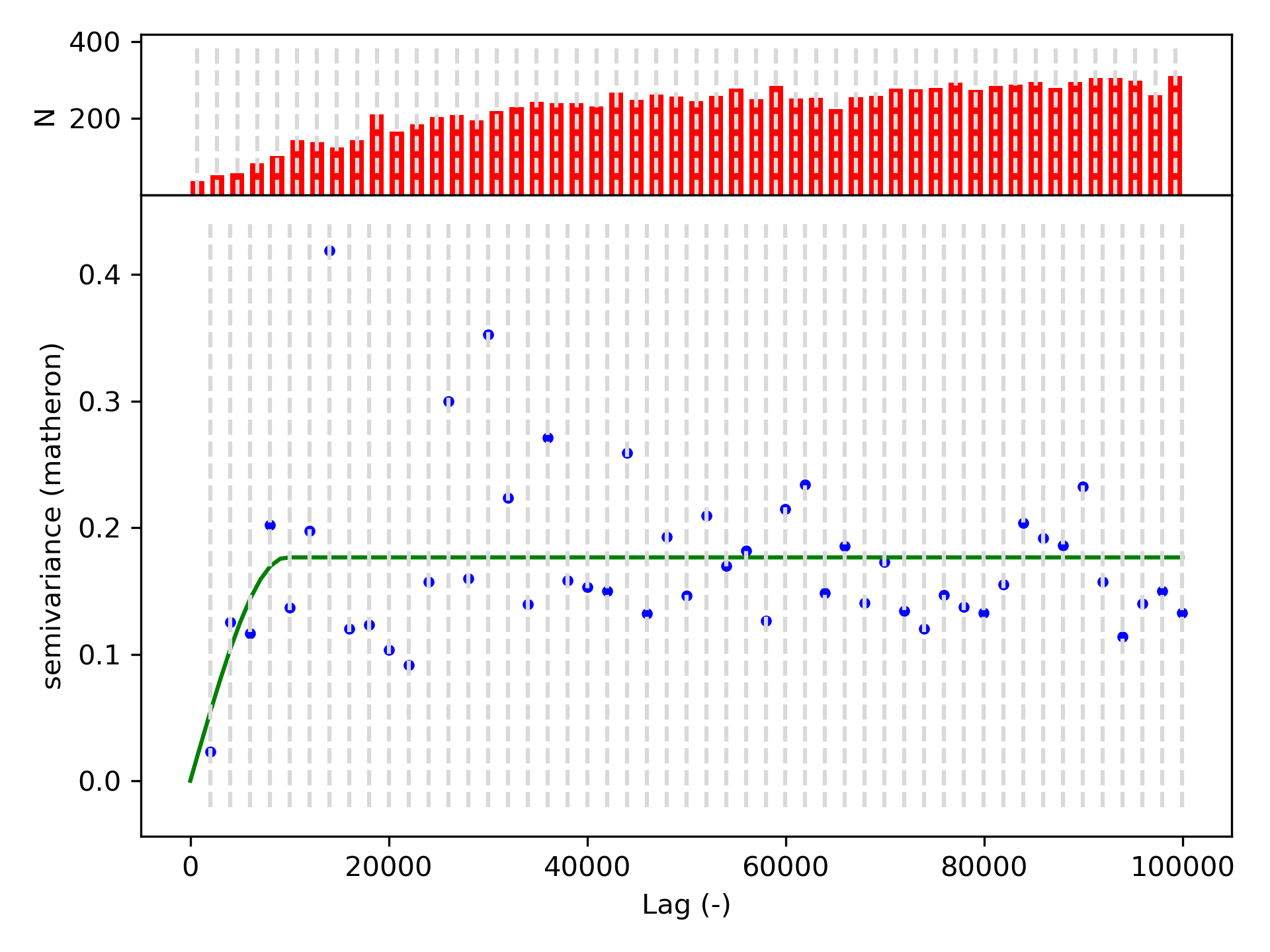
Print out the variogram model parameters#
# STUDENT CODE HERE
Variogram Model Parameters:
Model type: spherical
Nugget: 0.0000
Sill: 0.1765
Effective range: 9.6665 km
How did varying the maxlag affect your variogram and effective range? What does this sensitivity to maximum lag distance suggest? For the variogram you proceeded with (maxlag of 100km), interpret the effective range. What is this saying about snow depth physically, and does this match your intuition?#
Hint: When thinking about the sensitivity to maximum lag distance, revisit the reading on variogram calculation, specifically paying attention to stationarity and the brick example
STUDENT WRITTEN RESPONSE HERE
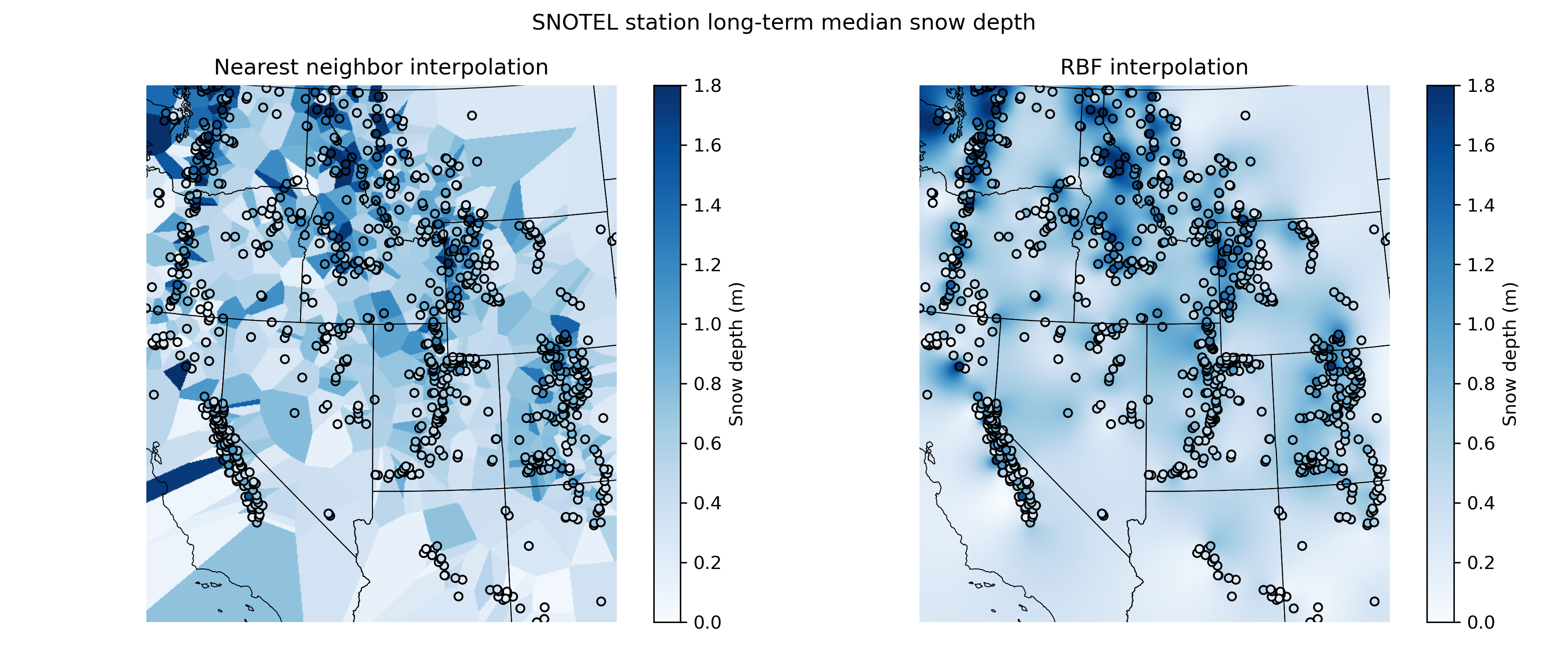
Now try interpolating the sparse snow depth points and plot a median snow depth raster using two deterministic interpolation methods, nearest interpolation and radial basis functions with a linear kernel#
For context, plot the states underneath and also the median snow depth point values (use the same colorbar as the raster)
x = coords[:,0]
y = coords[:,1]
z = values

bounds = stations_filtered_gdf.total_bounds
dx,dy = (3000,3000)

mpl_extent = (bounds[0],bounds[2],bounds[1],bounds[3])


xi = np.arange(np.floor(bounds[0]), np.ceil(bounds[2]),dx)
yi = np.arange(np.ceil(bounds[3]),np.floor(bounds[1]),-dy)
xx, yy = np.meshgrid(xi, yi)
interp_func_rbf = scipy.interpolate.Rbf(x, y, z, function='linear')
interp_rbf = interp_func_rbf(xx, yy)
interp_nearest = scipy.interpolate.griddata((x,y), z, (xx, yy), method='nearest')
# STUDENT CODE HERE
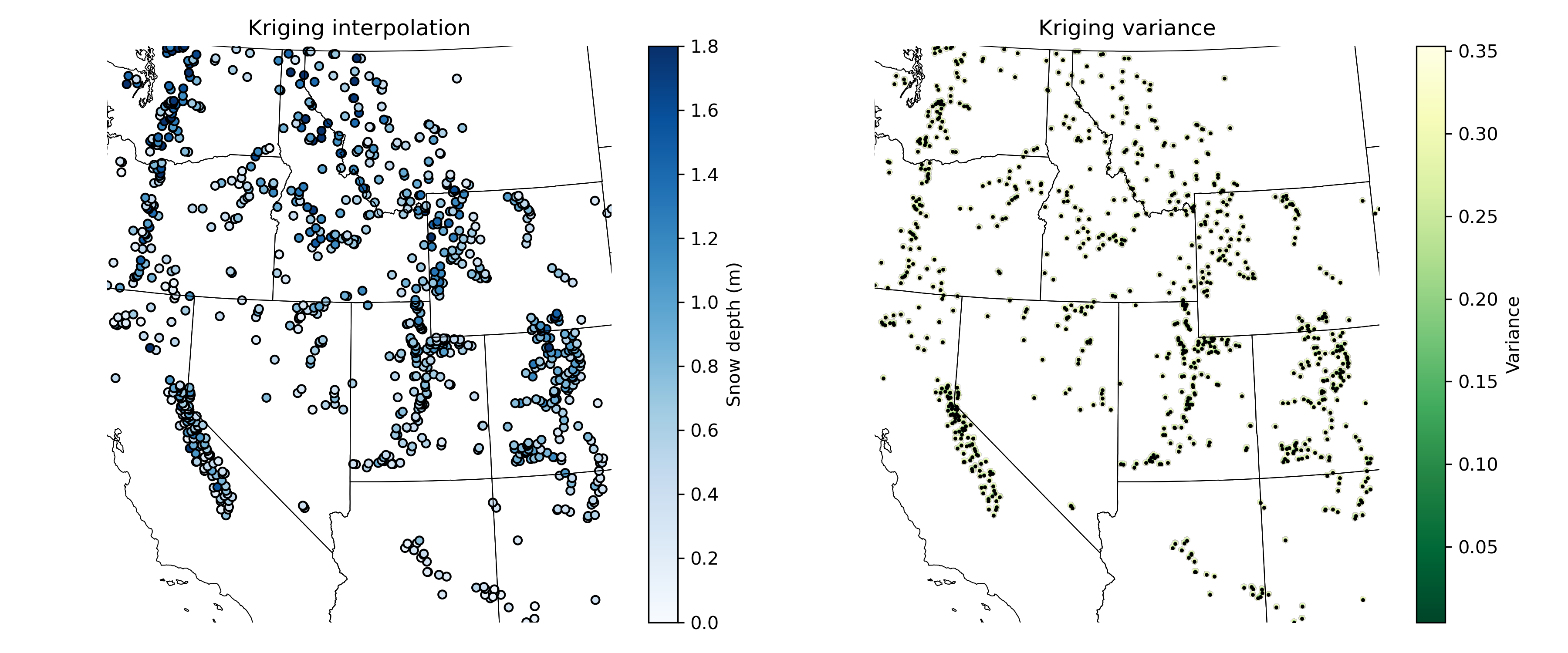
Finally, use the variogram you created to do Kriging interpolation and plot a median snow depth raster#
ok = skg.OrdinaryKriging(V, min_points=1, max_points=15, mode='exact')
field = ok.transform(xx.flatten(), yy.flatten()).reshape(xx.shape)
s2 = ok.sigma.reshape(xx.shape)
Warning: for 292311 locations, not enough neighbors were found within the range.
# STUDENT CODE HERE
f,axs=plt.subplots(1,3,figsize=(15,5))

axs[0].imshow(interp_nearest, extent=mpl_extent, cmap='Blues',vmin=0,vmax=1.8)
axs[0].set_title('Nearest neighbor interpolation')

axs[1].imshow(interp_rbf, extent=mpl_extent, cmap='Blues',vmin=0,vmax=1.8)
axs[1].set_title('RBF interpolation')

axs[2].imshow(field, extent=mpl_extent, cmap='Blues', vmin=0, vmax=1.8)
axs[2].set_title('Kriging interpolation')

for ax in axs:
    ax.set_xlim(bounds[0],bounds[2])
    ax.set_ylim(bounds[1],bounds[3])
    states_gdf.boundary.plot(ax=ax, color='k', linewidth=0.5)
    stations_filtered_gdf.plot(ax=ax, column='long_term_median', cmap='Blues', legend=True, legend_kwds={'label': 'Snow depth (m)'}, markersize=0.1, vmin=0, vmax=1.8, edgecolor='k')
    ax.set_aspect('equal')
    ax.axis('off')

f.tight_layout()
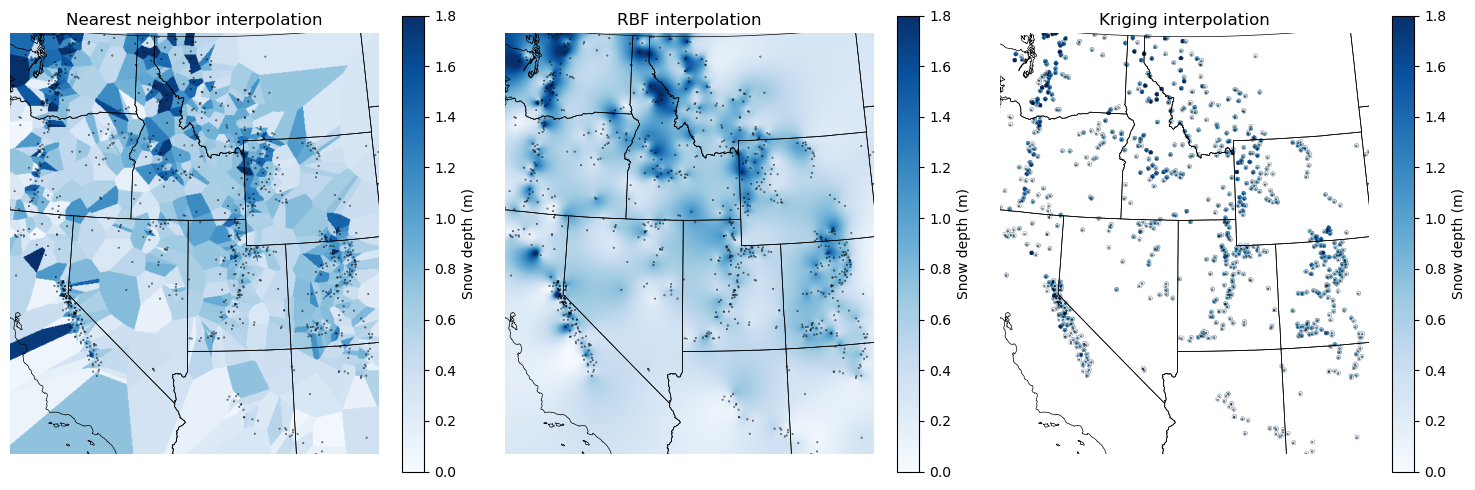
Written response: Interpret your interpolations! For each interpolation, describe a use case where you’d prefer this interpolation over the other two. For the Kriging interpolation, why are only small areas around the points interpolated?#
STUDENT WRITTEN RESPONSE HERE
Submission#
Save the completed notebook (make sure to fully run the notebook and check all cell output is visible)
Use the
git add; git commit -m 'message'; git pushworkflow to push your work to the remote repositoryideally you’ve been using add / commit / push as you make progress on this notebook
Check the remote repository to check all of the files you want to submit have been pushed
Scroll through your jupyter notebook on your remote repository and make sure all output and plots are visible
When you have completed your last push, submit the url pointing to your Github repository to the corresponding Canvas assignment